# 📝Introduction

At AI Planet, we started OpenAGI to make human-like agents accessible to everyone, thereby paving the way towards open agents and, eventually, AGI for everyone. We strongly believe in the transformative power of AI and believe this initiative will go a long way in solving many real-life problems. In its current form, OpenAGI aims to provide a framework for developers to create autonomous human-like agents.

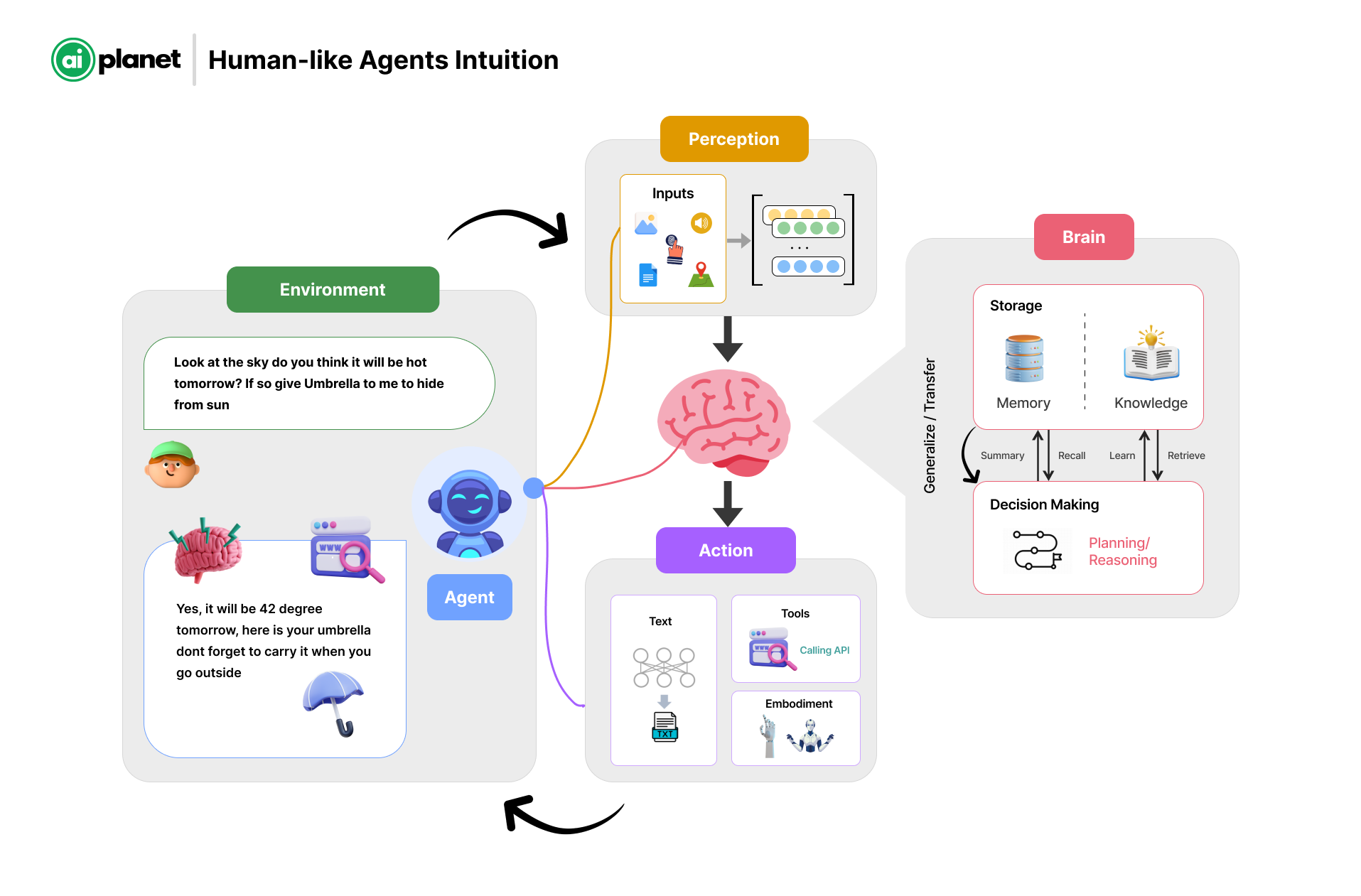
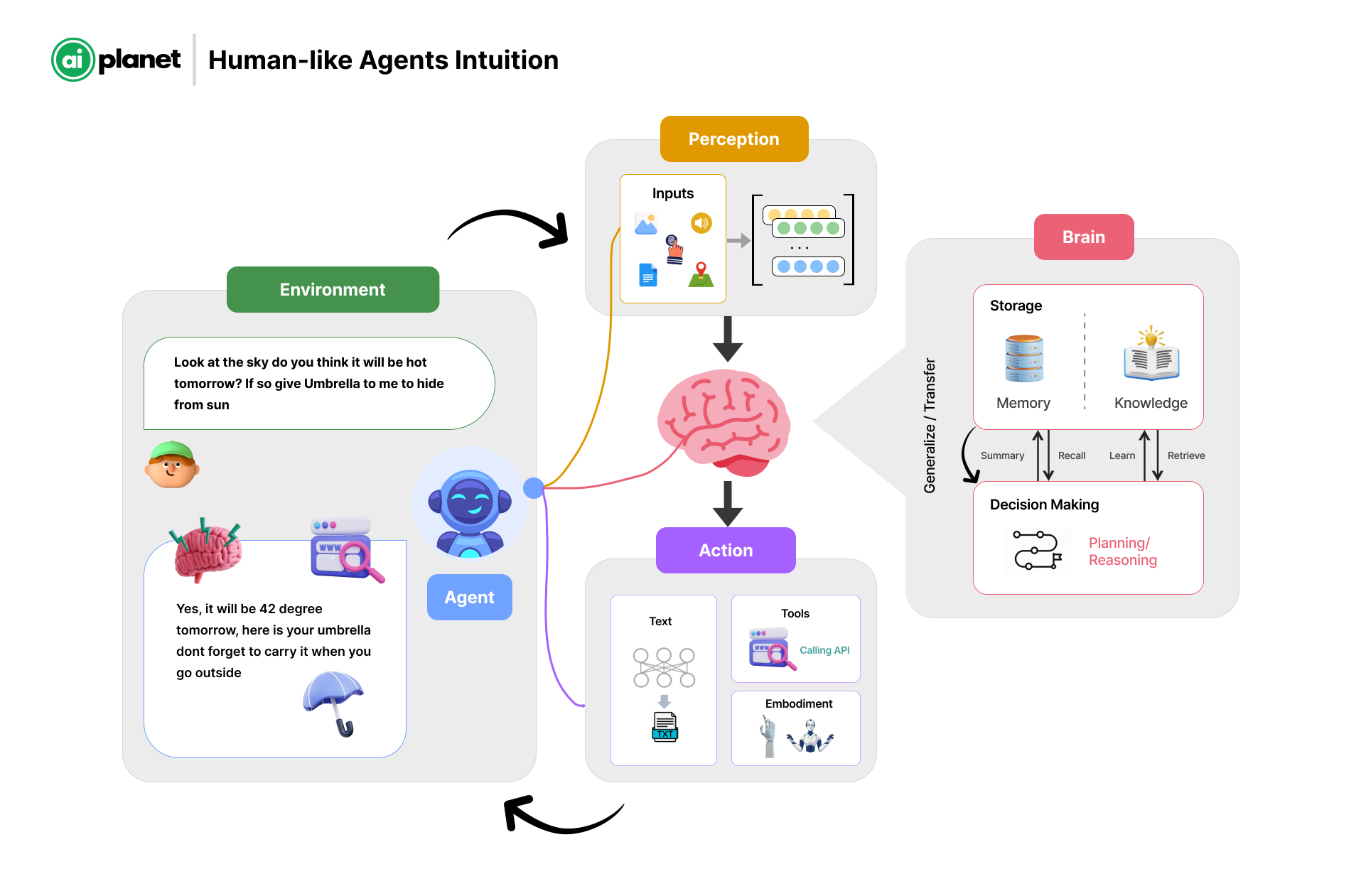
<figure><img src="/files/Lu6Pu0DmjSkxJYBtAwkT" alt=""><figcaption><p>Simple illustration of how autonomous agents would operate just like humans</p></figcaption></figure>

While the advancement of large language models (LLMs) led to numerous applications based on LLMs, at their core, these are adept at synthesizing and gathering information. On the other hand, agents demonstrate more autonomy; they engage in planning, reasoning, decision-making, and executing actions autonomously. The agents are just like humans, which will learn, improve, and become autonomous over time.

With OpenAGI, we aim to provide developers and organizations with the flexibility to build specialized agents that automate and solve complex problems. Agent use cases extend to various industries, they could include basic agents such as researching a topic, automating test cases, writing documentation for production code, and personalizing learning.

* **Education:** In education, agents can provide personalized learning experiences. They adapt and tailor learning content based on student's progress, performance and interests. It can extend to automating various other administrative tasks and assist teachers in improving their productivity.
* **Finance and Banking:** Financial services can use agents for fraud detection, risk assessment, personalized banking advice, automating trading, and customer service. They help in analyzing large volumes of transactions to identify suspicious activities and offer tailored investment advice.
* **Healthcare:** Agents can be deployed to monitor patients, provide personalized health recommendations, manage patient data, and automate administrative tasks. They can also assist in diagnosing diseases based on symptoms and medical history.

**The scope in the near future:**

We've been talking a lot about how these agents can get better by thinking about what they've done, learning from both humans and other peer agents via reflection of feedback, self-critics etc. This helps them improve and work more independently over time.

For example, we're thinking about tuning the platform in such a way that would enable developers to making agents that are really good at specific tasks over a period of time. For example: A specialized front-end developer with expertise in ReactJS. Just like human developers do, by working on many projects, these agents can learn and reuse what they've learned. They'll get better by thinking about their work, learning from feedback, and always trying to find the best solution.

Right now, we're just starting, and the agents can't remember things for a long time or plan ahead very well.  But these should get better soon. We're excited about the future and believe that our work will make open agents accessible for everyone, thereby solving meaningful real-life problems.

Below is a summary of the comparison between the capabilities of LLM apps and agents.

| Feature                  | LLM applications                                                         | Agents/Assistants                                                                                      |
| ------------------------ | ------------------------------------------------------------------------ | ------------------------------------------------------------------------------------------------------ |
| **Core Function**        | Aggregating and synthesizing information from existing data.             | Planning, reasoning, decision-making, and executing actions autonomously.                              |
| **Learning Method**      | Supervised and unsupervised learning from vast datasets.                 | Continual learning from new experiences and adapting over time without explicit retraining.            |
| **Decision Making**      | Limited to choosing responses based on probability and patterns in data. | Complex decision-making involving ethics, long-term planning, and unforeseen situations.               |
| **Autonomy**             | Operates within the scope defined by its programming and data.           | High degree of autonomy, capable of setting goals and pursuing them independently.                     |
| **Physical Interaction** | Generally, none, as it focuses on digital and informational tasks.       | Direct interaction with the physical world, including manipulation of objects and navigation in space. |

#### Features of OpenAGI

* **Flexible Agent Architecture**: OpenAGI features a flexible agent architecture, allowing users to easily create sequential, parallel, and dynamic communication patterns. This flexibility is designed to help users efficiently tackle their unique challenges.
* **Streamlined Integration and Configuration**: OpenAGI introduces simplified integration and configuration processes, eliminating the infinite loops commonly encountered in other tools.
* **Automated & Manual Agent Configuration Generation**: We provide the functionality to automatically generate the necessary configurations for building agents and their corresponding configurations. For developers preferring a hands-on approach, OpenAGI supports the manual configuration of agent solutions. This allows for detailed customization according to specific needs and preferences.


# Installation

To install OpenAGI, lets practice some best practice by creating a virtual environment and installing the package.

#### Setup a virtual environment

```bash
# For Mac users
python3 -m venv venv
source venv/bin/activate

# For Windows users
python -m venv venv
venv/scripts/activate

# to create virtual env using particular python version (in Windows)
py -3.11 -m venv venv
```

#### Install the Package

```bash
pip install openagi
```


# Quickstart

Lets build our first Agent use cases.

In this quickstart, we'll explore one of the use cases to demonstrate the execution of the Agent. We'll focus on querying Search Engines tools like `DuckDuckGoSearchTool` to gather the information on 3 Days Trip to San Francisco and Bay area based on recent days.

Agents excel at autonomously performing multiple tasks, making decisions on the fly, and communicating with other agents. For this use case, we will let `Admin` Agent to auto-decompose or `Plan` the task and use tools as the supported `Actions`.

### 1. Import required modules

To get started, we need to initialize a few methods from the modules.

* Admin
* Worker
* Action
* Large Language Model
* Memory
* Planner

```python
from openagi.agent import Admin
from openagi.worker import Worker
from openagi.actions.files import WriteFileAction
from openagi.actions.tools.ddg_search import DuckDuckGoNewsSearch
from openagi.actions.tools.webloader import WebBaseContextTool
from openagi.llms.openai import OpenAIModel
from openagi.memory import Memory
from openagi.planner.task_decomposer import TaskPlanner
```

### 2. Setting LLM configuration

To authenticate your requests to the OpenAI API (by default OpenAI Model will be used), you need to set your API key as an environment variable. This is essential for ensuring secure and authorised access to the API services.

```python
import os
os.environ["OPENAI_API_KEY"] = "sk-proj-xxxxxxxxxxxxxxxxxx"

config = OpenAIModel.load_from_env_config()
llm = OpenAIModel(config=config)
```

Replace `sk-proj-xxxxxxxxxxxxxxxxxx` with your actual OpenAI API key.

### 3. Setup Workers with Tools and Action

Workers are specialized classes tasked with executing the assignments given by the "Admin" class. They use tools such as internet news search engines, LLMs, and document writers to complete their tasks, individually and in cohesion (for complex tasks like writing blog articles).

An action is a functionality that enables the Agent to fetch, process, and store data for further analysis and decision-making.

* `DuckDuckGoNewsSearch`: This tool fetches real-time news data using the DuckDuckGo search engine, providing up-to-date information.
* `WebBaseContextTool`: This tool is used to extract information from Web Pages. It also provides a way to load and optionally summarize the content of a webpage.
* `WriteFileAction`: This action saves the written file to the specified location, ensuring data persistence.

```python
# Declare the Worker objects

# Initialize the researcher who uses DuckDuckGo to search a topic and extract information from the web pages.
researcher = Worker(
    role="Researcher",
    instructions="sample instruction.",
    actions=[
        DuckDuckGoNewsSearch,
        WebBaseContextTool,
    ],
)
# initialize the writer who writes the content of the topic using the tools provided
writer = Worker(
    role="Writer",
    instructions="sample instruction.",
    actions=[
        DuckDuckGoNewsSearch,
        WebBaseContextTool,
    ],
)
# initialize the reviewer who reviews the content written by the writer and saves the content into a file using the write file action tool.
reviewer = Worker(
    role="Reviewer",
    instructions="sample instruction.",
    actions=[
        DuckDuckGoNewsSearch,
        WebBaseContextTool,
        WriteFileAction,
    ],
)
```

### 4. Execute the Admin Agent

The Admin Agent serves as the central part for decision-maker, comprehending task specifications in form of supported actions and executing them in a human-like manner.

In order to execute the agent, user needs to specify their query and description to get the response from the Admin agent.

```python
# define the Admin with Planner, Memory and LLM. Further assign the workers in order
admin = Admin(
    planner=TaskPlanner(human_intervene=False),
    memory=Memory(),
    llm=llm,
)

# Assign sub-tasks to workers
admin.assign_workers([researcher, writer, reviewer])

result = admin.run(
    query="Write an article on places to visit in Spain.",
    description="You are a knowledgeable local guide with extensive information about Spain, its attractions and customs.",
)

print(result)
```


# Admin

## What is an Admin?

Imagine Admin as the master task executor who is responsible for all the major configurations for the execution. From planning of tasks to execution, and defining the brain which is what LLM to use and whether or not to use memory.

Admin is the decision-maker that understand the specifications of tasks and execute them in a more human-like manner.

## Attributes

The `Admin` class in the `openagi` library is a central component designed to manage and orchestrate various functionalities within the framework. Below is a detailed explanation of its components, attributes, and usage.

The `Admin` class in the OpenAGI framework can be considered an Agent.

<table><thead><tr><th width="179">Attribute</th><th width="179">Optional Parameter</th><th>Description</th></tr></thead><tbody><tr><td><strong>planner</strong></td><td></td><td>Help us define the type of planner we can use to decompose the given task into sub tasks.</td></tr><tr><td><strong>llm</strong></td><td></td><td>Users can provide an LLM of their choosing, or use the default one.</td></tr><tr><td><strong>memory</strong></td><td>Yes</td><td>Users can initiate Admin memory, to recall and remember the task and it's response</td></tr><tr><td><strong>actions</strong></td><td></td><td>Admin can be given access to various actions to perform it's task, such as SearchAction, Github Action, etc.</td></tr><tr><td><strong>output_format</strong></td><td>Yes</td><td>Users can define the output format as either "markdown" or "raw_text"</td></tr><tr><td><strong>max_steps</strong></td><td>Yes</td><td>The number of iterations admin can perform to obtain appropriate output.</td></tr></tbody></table>

### Code Snippet

<pre class="language-python"><code class="lang-python">from openagi.agent import Admin

<strong>admin = Admin(
</strong>    llm=llm,
    actions=actions,
    planner=planner,
)
</code></pre>

Below we have shown how one can initiate and run a simple admin query.

```python
# imports
from openagi.agent import Admin
from openagi.llms.openai import OpenAIModel
from openagi.planner.task_decomposer import TaskPlanner
from openagi.actions.tools.ddg_search import DuckDuckGoSearch
from openagi.memory import Memory

# Define LLM
config = OpenAIModel.load_from_env_config()
llm = OpenAIModel(config=config)

# declare the Admin
admin = Admin(
    llm=llm,
    actions=[DuckDuckGoSearch],
    planner=TaskPlanner(human_intervene=False),
    memory=Memory(),
    output_type=OutputFormat.markdown, # Defaults to markdown
)

# execute the task
res = admin.run(
            query="sample query",
            description="sample description",
            )
```


# Workers

### What is a Worker?

Workers are special type of classes, responsible for carrying out the tasks assigned by the class "Admin". They utilize tools such as internet search engines, LLMs, and document writers to perform their tasks. Additionally, they can determine which tools to use from a predefined set.

Similarly to how a large task like writing a blog is decomposed into smaller steps such as researching, drafting, and publishing, the admin can define a large task and split it into smaller tasks that are then assigned to the workers.

### Attributes

Workers possess attributes that facilitate the execution and completion of smaller, independent tasks.

<table><thead><tr><th width="160">Attribute</th><th width="204">Optional Parameter</th><th>Description</th></tr></thead><tbody><tr><td>role</td><td></td><td>It is a string input that defines the Functionality or Responsibility of the worker.</td></tr><tr><td>instructions</td><td></td><td>A paragraph about how the LLM should behave related to its role can also include the backstory and other relevant details that might aid in generating the output.</td></tr><tr><td>actions</td><td>Yes</td><td>This configurable parameter takes a list that lets us specify the set of tools available to the worker. The worker may or may not use these tools. If no tools are specified, or if the action list is empty, the worker defaults to the actions set by the admin.</td></tr><tr><td>llm</td><td>Yes</td><td>This parameter is configurable, allowing the worker to either use a specified LLM or default to the LLM designated by the admin.</td></tr><tr><td>max_iterations</td><td>Yes</td><td>This parameter specifies the maximum number of iterations, as an integer, allowed to achieve the objective of the given task.</td></tr><tr><td>force_output</td><td>Yes</td><td>This boolean parameter determines whether to force an output or answer after reaching the maximum iteration limit.</td></tr></tbody></table>

### Code Snippet

The primary components,`TaskWorker`, provide a structured way to define and execute tasks. The `TaskWorker` class specializes in executing specific tasks assigned by the planner.

```python
from openagi.worker import Worker

worker = Worker(
        role=role,
        instructions=instructions,
        actions=actions,
        llm=llm,
        max_iterations=max_iterations,
        force_output=force_output
    )
```

Below we have shown how one can initiate and run a simple admin-worker query.

```python
# import the required packages
from openagi.actions.files import WriteFileAction
from openagi.actions.tools.ddg_search import DuckDuckGoNewsSearch
from openagi.actions.tools.webloader import WebBaseContextTool
from openagi.agent import Admin
from openagi.llms.azure import AzureChatOpenAIModel
from openagi.memory import Memory
from openagi.planner.task_decomposer import TaskPlanner
from openagi.worker import Worker

# configure the LLM
config = AzureChatOpenAIModel.load_from_env_config()
llm = AzureChatOpenAIModel(config=config)

# Declare the Worker objects

# Initialize the researcher who uses DuckDuckGo to search a topic and extract information from the web pages.
researcher = Worker(
    role="Researcher",
    instructions="sample instruction.",
    actions=[
        DuckDuckGoNewsSearch,
        WebBaseContextTool,
    ],
)
# initialize the writer who writes the content of the topic using the tools provided
writer = Worker(
    role="Writer",
    instructions="sample instruction.",
    actions=[
        DuckDuckGoNewsSearch,
        WebBaseContextTool,
    ],
)
# initialize the reviewer who reviews the content written by the writer and saves the content into a file using the write file action tool.
reviewer = Worker(
    role="Reviewer",
    instructions="sample instruction.",
    actions=[
        DuckDuckGoNewsSearch,
        WebBaseContextTool,
        WriteFileAction,
    ],
)

# declare the Admin object with Task Planner, Memory, and LLM
admin = Admin(
    planner=TaskPlanner(human_intervene=False),
    memory=Memory(),
    llm=llm,
)

# Assign sub-tasks to workers
admin.assign_workers([researcher, writer, reviewer])

# run the admin object
res = admin.run(
    query="Write a blog post.",
    description="sample description.",
)
```


# Planner

## What is Planner?

Planner is one of the important component of any Agent framework, which enables the agent to divide a task into multiple subtasks based on the requirement. We call this step as **Task Decomposition.**

The `Planner` in the `OpenAGI` contains essential modules and components that handle task planning and decomposition. These components are designed to work together to break down complex tasks into manageable sub-tasks, which are then executed by Admin.

Below is a detailed explanation of the attributes and functionality of the modules within the `Planner`.

## Attributes

<table><thead><tr><th width="185">Parameter</th><th width="195">Optional Parameter</th><th>Description</th></tr></thead><tbody><tr><td>human_intervene</td><td>No</td><td>It indicates the framework that after generating output, it should ask human for feedback and make changes to output based on that.</td></tr><tr><td>autonomous</td><td>No</td><td>Autonomous will self assign role and instructions and divide it among the workers. The default is `False`</td></tr><tr><td>input_action</td><td>Yes</td><td>It shows how user can provide feedback to the Admin during execution.</td></tr><tr><td>prompt</td><td>Yes</td><td>An optional prompt to be used for task planning.</td></tr><tr><td>workers</td><td>Yes</td><td>Workers can represent different agents or processes that handle specific subtasks, enabling parallel execution and improving efficiency. If no workers are specified, the planner will operate without additional parallel processing capabilities.</td></tr><tr><td>llm</td><td>Yes</td><td>This parameter allows the user to specify the Large Language Model (LLM) that will be used for generating responses and planning tasks.</td></tr><tr><td>retry_threshold</td><td>Yes</td><td>This parameter defines the maximum number of times the planner will attempt to retry a task if it fails to execute successfully. The default value is <code>3.</code></td></tr></tbody></table>

### Code Snippet

The primary component, `TaskPlanner`, allows for the decomposition of tasks into smaller sub-tasks and the planning of their execution. This modular approach facilitates efficient task management and execution within the OpenAGI framework.

```python
from openagi.planner.task_decomposer import TaskPlanner

planner = TaskPlanner(human_intervene=False)
# make TaskPlanner autonomous = True for auto creating workers
# Autonomous Multi Agent Architecture
# plan = TaskPlanner(autonomous=True,human_intervene=True)
```

Below we have shown how one can initiate and run using query.

```python
# imports
from openagi.agent import Admin
from openagi.llms.openai import OpenAIModel
from openagi.planner.task_decomposer import TaskPlanner
from openagi.actions.tools.ddg_search import DuckDuckGoSearch

# Define LLM
config = OpenAIModel.load_from_env_config()
llm = OpenAIModel(config=config)

# Planner Usage
admin = Admin(
    llm=llm,
    actions=[DuckDuckGoSearch],
    planner=TaskPlanner(human_intervene=False),
)

# Run Admin
res = admin.run(
            query="sample query",
            description="sample description",
            )
```


# LLM

Large Language Models (LLMs) serve as the backbone for executing Agentic workflows. LLMs excel at generating responses and, when combined with human-like planning, reasoning, and task decomposition, give rise to the concept of Agents. In OpenAGI, LLMs plan and reason to decompose task objectives into sub-tasks. They then execute these sub-tasks and return meaningful responses to the user.

LLMs can be implemented within the Admin and utilize a Planner to execute tasks. Currently, OpenAGI supports two LLMs: OpenAI and Azure ChatOpenAI models.

### OpenAI Model

OpenAGI supports the GPT-3.5 model by default, represented as OpenAGI. To initialise this model, you need to insert the OpenAI API key inside the environment file and pass the configuration details as parameters to execute the LLM.

```python
import os
from openagi.llms.openai import OpenAIModel

os.environ['OPENAI_API_KEY'] = "sk-<replace-with-your-key>"

config = OpenAIModel.load_from_env_config()
llm = OpenAIModel(config=config)
```

### Azure ChatOpenAI Model

For a Large Language Model, context length is crucial. To utilize a large context, such as 32K from GPT-4, we employ the AzureOpenAI chat model. To initialise this model, you need to insert the parameter configuration inside the environment file and pass the configuration details as parameters to execute the LLM.

```python
import os
from openagi.llms.azure import AzureChatOpenAIModel

os.environ["AZURE_BASE_URL"]="https://<replace-with-your-endpoint>.openai.azure.com/"
os.environ["AZURE_DEPLOYMENT_NAME"] = "<replace-with-your-deployment-name>"
os.environ["AZURE_MODEL_NAME"]="gpt4-32k"
os.environ["AZURE_OPENAI_API_VERSION"]="2023-05-15"
os.environ["AZURE_OPENAI_API_KEY"]=  "<replace-with-your-key>"

config = AzureChatOpenAIModel.load_from_env_config()
llm = AzureChatOpenAIModel(config=config)
```

### Groq Model

Groq is an inference engine specifically designed for applications requiring low latency and rapid responses. It uses open-source models such as Mistral, Gemma, and Llama 2, delivering hundreds of tokens per second, making it faster than other models. To initialize this model, you need to insert the Groq API key along with the model name and temperature in the environment variables.

Get the API key from here: <https://console.groq.com/keys>

```python
import os
from openagi.llms.groq import GroqModel

os.environ['GROQ_API_KEY'] = '<groq-api-key>'
os.environ['GROQ_MODEL'] = '<model-name>'
os.environ['GROQ_TEMP'] = '<temperature>'

config = GroqModel.load_from_env_config()
llm = GroqModel(config=config)
```

### Gemini Model

This model includes the Gemini family models from Google, which includes `Gemini-1.0-pro` and `Gemini-pro`. To initialize this model, you need to insert the Google API key along with the model name and the temperature.

Get the API key from here: <https://ai.google.dev/>

```python
import os
from openagi.llms.gemini import GeminiModel

os.environ['GOOGLE_API_KEY'] = '<google-api-key>'
os.environ['Gemini_MODEL'] = '<model-name>'
os.environ['Gemini_TEMP'] = '<temperature>'

config = GeminiModel.load_from_env_config()
llm = GeminiModel(config=config)
```

### Ollama Model

Ollama allows you to run models locally, providing a straightforward way to integrate them into your applications.**Installation Steps:**

1. **Download Ollama**: Visit [Ollama's download page](https://ollama.com/download) to get the appropriate version for your operating system (macOS, Linux, or Windows).
2. **Install Ollama**: Use the following command to install Ollama via pip:

   ```
   pip install ollama
   ```

**Basic Ollama Commands:**

* To load the Llama2 model locally:

  ```
  ollama pull mistral
  ```
* To load the Gemma model locally:

  ```
  ollama pull gemma
  ```
* To display all the models that are installed:

  ```
  ollama list
  ```

For more commands, refer to the [Ollama GitHub repository](https://github.com/ollama/ollama).

**Running the Model:**&#x42;efore executing the Ollama model, ensure that the model is running locally in your terminal. You can start the Llama2 model with the following command:

```
ollama run mistral
```

This setup allows you to utilize the Ollama model effectively within your applications, similar to other models supported by OpenAGI. This format aligns with the existing documentation style and provides clear instructions for users to get started with the Ollama model.

```python
import os
from openagi.llms.ollama  import OllamaModel

os.environ['OLLAMA_MODEL'] = "mistral"

config = OllamaModel.load_from_env_config()
llm = OllamaModel(config=config)
```

### SambaNova Model

SambaNova provides high-performance cloud AI services with support for various LLM models including Meta's Llama family. To initialize this model, you need to configure several parameters including the API key, base URL, and project ID. The model supports advanced parameters like temperature, max tokens, and top\_p for fine-tuned control over the generation process.

```python
import os
from openagi.llms.sambanova import SambaNovaModel

os.environ['SAMBANOVA_API_KEY'] = '<your-api-key>'
os.environ['SAMBANOVA_BASE_URL'] = '<your-base-url>'
os.environ['SAMBANOVA_PROJECT_ID'] = '<your-project-id>'
os.environ['SAMBANOVA_MODEL'] = 'Meta-Llama-3.3-70B-Instruct'  # default model
os.environ['SAMBANOVA_TEMPERATURE'] = '0.7'  # default temperature
os.environ['SAMBANOVA_MAX_TOKENS'] = '1024'  # default max tokens
os.environ['SAMBANOVA_TOP_P'] = '0.01'  # default top_p
os.environ['SAMBANOVA_STREAMING'] = 'False'  # default streaming setting

config = SambaNovaModel.load_from_env_config()
llm = SambaNovaModel(config=config)

```

### Cerebras Model

Cerebras offers cloud AI services with access to various LLM models. The platform provides access to different versions of the Llama model family. To initialize this model, you need to provide your API key and can optionally configure the model name and temperature settings.

```python
import os
from openagi.llms.cerebras import CerebrasModel

os.environ['CEREBRAS_API_KEY'] = '<your-api-key>'
os.environ['Cerebras_MODEL'] = 'llama3.1-8b'  # default model
os.environ['Cerebras_TEMP'] = '0.7'  # default temperature

config = CerebrasModel.load_from_env_config()
llm = CerebrasModel(config=config)
```


# Action

### What is Action?

Actions provide predefined functionalities that the Agent can invoke to accomplish various tasks. These tasks include fetching data from external sources, processing the data to extract meaningful insights, and storing the results for subsequent use.

The Agent invokes actions during its runtime to execute specific tasks. For example, when a user queries the agent, the agent might use a search action to gather information and then a processing action to analyze it

### Attributes

The parameter attributes for Actions is dynamic and it varies based on the different use cases. One can directly pass the supported tools, files as list for defining the actions.

### Code Snippet

```python
from openagi.actions.files import WriteFileAction
from openagi.actions.tools.ddg_search import DuckDuckGoSearch

actions = [
        DuckDuckGoSearch,
        WriteFileAction,
] 
```


# Tools

## What is Tool?

Tool is a functionality based on which the data is fetched to the Agent for further analysis and decision making. A wide array of tools is cataloged in the tools database, designed to support activities such as internet searches, email dispatch, interactions with Git repositories, and much more. Users have the flexibility to create their own tools and seamlessly integrate them into the framework's operations.

> Note: Some of the tools are not pre-installed with the OpenAGI library. If you encounter an `OpenAGIException` due to an Import Error, you'll need to manually install the required package to use the tool.

## Tool configuration

### 1. DuckDuckGoSearch Tool

The DuckDuckGoSearch tool is a tool that can be used to search for words, documents, images, videos, news, maps and text translation using the DuckDuckGo.com search engine. DuckDuckGo Search is a web search engine that *DuckDuckGo* is an independent Google alternative that lets you search and browse the web, but it emphasises protecting user privacy and avoiding the filter bubble of personalised search results.

```python
from openagi.actions.tools.ddg_search import DuckDuckGoSearch

# Initialize the DuckDuckGo search tool
ddg_tool = DuckDuckGoSearch(
    query="Your search query"  # Required: The search term to look up
)

# Execute the search
result = ddg_tool.execute()
# Returns search results including web pages and content
```

### 2. Serper Search Tool

Serper is a low-cost Google Search API that can be used to add answer box, knowledge graph, and organic results data from Google Search. This tool is mainly helps user to query the Google results with less throughput and latency.

**Setup API**

There are two ways to configure the API key:

1. Using the recommended configuration method:

```python
from openagi.actions.tools.serper_search import GoogleSerpAPISearch
GoogleSerpAPISearch.set_config(api_key='your-api-key')
```

2. Using environment variables (deprecated):

```python
import os
os.environ['GOOGLE_SERP_API_KEY'] = "<replace-with-your-api-key>"
```

Get your API key: <https://serper.dev/>

Usage:

```python
from openagi.actions.tools.serp_search import GoogleSerpAPISearch

# Initialize the Serper search tool
serp_tool = GoogleSerpAPISearch(
    query="Your search query",  # Required: The search query to look up
    max_results=10             # Optional: Number of results to return (default: 10)
)

# Execute the search
result = serp_tool.execute()
# Returns formatted search results with titles, snippets, and URLs
```

The tool requires the following parameters:

* `query`: The search query string to look up on Google
* `max_results`: (Optional) Number of results to return, defaults to 10

The tool will return search results including titles, snippets, and URLs from Google search results.

### 3. Google Search Tool

The Google Search Tool enables searching and extracting information from Google search results using the googlesearch-python library. This tool provides a simple way to scrape Google search results without requiring an API key.

**Installation**

```bash
pip install googlesearch-python
```

Usage:

```python
from openagi.actions.tools.google_search_tool import GoogleSearchTool

# Initialize the Google search tool
google_tool = GoogleSearchTool(
    query="Your search query",          # Required: The search query to look up
    max_results=10,                     # Optional: Number of results (default: 10, max: 15)
    lang="en"                           # Optional: Language for search results (default: "en")
)

# Execute the search
result = google_tool.execute()
# Returns formatted search results with titles, descriptions, and URLs
```

### 4. SearchApiSearch

[SearchApi.io](https://searchapi.io/) provides a real-time API to access search results from Google (default), Google Scholar, Bing, Baidu, and other search engines. Any existing or upcoming SERP engine that returns `organic_results` is supported. The default web search engine is `google`, but it can be changed to `bing`, `baidu`, `google_news`, `bing_news`, `google_scholar`, `google_patents`, and others.

**Setup API Key**

There are two ways to configure the API key:

1. Using the recommended configuration method:

```python
from openagi.actions.tools.searchapi_search import SearchApiSearch
SearchApiSearch.set_config(api_key='your-api-key', engine='google')  # engine is optional
```

2. Using environment variables (deprecated):

```python
import os
os.environ['SEARCHAPI_API_KEY'] = "<replace-with-your-api-key>"
```

Get your API key from [SearchApi.io](https://vscode-file/vscode-app/Applications/Aide.app/Contents/Resources/app/out/vs/code/electron-sandbox/workbench/workbench.html).

Usage:

```python
from openagi.actions.tools.searchapi_search import SearchApiSearch

# Configure API key (recommended way)
SearchApiSearch.set_config(api_key='your-api-key', engine='google')

# Initialize the SearchAPI tool
search_api_tool = SearchApiSearch(
    query="Your search query"  # Required: The search query to look up
)

# Execute the search
result = search_api_tool.execute()
# Returns search results from the configured search engine
```

The tool requires the following parameter:

* `query`: The search query string to look up

The tool will return search results including titles, snippets, and URLs from the configured search engine (defaults to Google).

Supported search engines include:

* Google (default)
* Google Scholar
* Bing
* Baidu
* Google News
* Bing News
* Google Patents

### 5. Github Search Tool

The Github SearchTool is used for retrieving information from Github repositories using natural language queries. This tool provides functionality for querying Github repositories for various information, such as code changes, commits, active pull requests, issues, etc., using natural language input. It is designed to be used as part of a larger AI-driven agent system.

#### Setup API

```python
import os

os.environ['GITHUB_ACCESS_TOKEN'] = "<add-your-access-token>"
```

Get your GitHub Access Token: <https://docs.github.com/en/authentication/keeping-your-account-and-data-secure/managing-your-personal-access-tokens>

```python
from openagi.actions.tools.github_search_tool import GitHubFileLoadAction

# Set GitHub access token in environment
import os
os.environ['GITHUB_ACCESS_TOKEN'] = "<your-github-token>"

# Initialize the GitHub search tool
github_tool = GitHubFileLoadAction(
    repo="username/repository",  # e.g., "aiplanethub/openagi"
    directory="path/to/files",   # e.g., "src/openagi/llms"
    extension=".py"              # File extension to filter
)

# Execute the search
result = github_tool.execute()
# Returns content and metadata of matching files
```

### 6. YouTube Search Tool

The YouTube Search tool allows users to search for videos on YouTube using natural language queries. This tool retrieves relevant video content based on user-defined search parameters, making it easier to find specific videos or topics of interest.

The YouTube Search tool does not require an API key but does require the installation of specific libraries. You need to install `yt-dlp` and `youtube-search` to use this tool.

```
pip install yt-dlp
pip install youtube-search
```

**Code Snippet** To initialize the YouTube Search tool, you can use the following code:

```python
from openagi.actions.tools.youtubesearch import YouTubeSearchTool

# Initialize the YouTube search tool
youtube_tool = YouTubeSearchTool(
    query="Your search query",  # Required: The keyword to search for
    max_results=5              # Optional: Number of results to return (default: 5)
)

# Execute the search
result = youtube_tool.execute()
# Returns video titles, descriptions, and URLs
```

The tool requires the following parameters:

* `query`: The search keyword or phrase to look up on YouTube
* `max_results`: (Optional) Number of video results to return, defaults to 5

The tool will return search results including:

* Video titles
* Video descriptions
* Video URLs (in format: [https://youtube.com/watch?v=VIDEO\_ID](https://vscode-file/vscode-app/Applications/Aide.app/Contents/Resources/app/out/vs/code/electron-sandbox/workbench/workbench.html))

### 7. Tavily QA Search Tool

The Tavily QA Search tool is designed to provide answers to user queries by fetching data from various online sources. This tool enhances the capability of the agent to retrieve precise information and answer questions effectively.

**Installation**

```
pip install tavily-python
```

For the Tavily QA Search tool, you also need to set up the API key in your environment variables:

```python
import os

# Set the Tavily API key in the environment variable
os.environ['TAVILY_API_KEY'] = "<replace-with-your-tavily-api-key>"
```

**Code Snippet** To initialize the Tavily QA Search tool, you can use the following code:

```python
from openagi.actions.tools.tavilyqasearch import TavilyWebSearchQA

# Configure API key (recommended way)
TavilyWebSearchQA.set_config(api_key='your-api-key')

# Initialize the Tavily QA search tool
tavily_tool = TavilyWebSearchQA(
    query="Your search query"  # Required: The question or query to search for
)

# Execute the search
result = tavily_tool.execute()
# Returns AI-generated answers based on web content
```

The tool requires the following parameter:

* `query`: The search query or question to look up

The tool will return comprehensive search results with AI-generated answers based on the most relevant web content found.

### 8. Exa Search Tool

The Exa Search tool allows users to query the Exa API to retrieve relevant responses based on user-defined questions. This tool is particularly useful for extracting information and insights from various data sources using natural language queries.

**Installation**

```
pip install exa-py
```

To use the Exa Search tool, you need to set up the API key in your environment variables. Here’s how to do that:

```python
import os

# Set the Exa API key in the environment variable
os.environ['EXA_API_KEY'] = "<replace-with-your-exa-api-key>"
```

**Code Snippet**

```python
from openagi.actions.tools.exasearch import ExaSearch

# Configure API key (recommended way)
ExaSearch.set_config(api_key='your-api-key')

# Initialize the Exa search tool
exa_tool = ExaSearch(
    query="Your search query"  # Required: The search query to look up
)

# Execute the search
result = exa_tool.execute()
# Returns relevant content from search results
```

### 9. Unstructured PDF Loader Tool

The Unstructured PDF Loader tool is designed to extract content, including metadata, from PDF files. It utilizes the Unstructured library to partition the PDF and chunk the content based on titles. This tool is useful for processing large volumes of PDF documents and making their contents accessible for further analysis.

**Installation**

```
pip install unstructured
```

**Code Snippet**

```python
from openagi.actions.tools.unstructured_io import UnstructuredPdfLoaderAction

# Initialize the PDF loader tool with configuration
pdf_tool = UnstructuredPdfLoaderAction()
pdf_tool.set_config(filename="/path/to/your/file.pdf")

# Execute the loader
result = pdf_tool.execute()
# Returns structured content from PDF including metadata
```

### 10. Wikipedia Search Tool

The Wikipedia Search tool enables searching and retrieving information from Wikipedia articles. This tool provides functionality to search Wikipedia articles and retrieve summaries, with built-in handling for disambiguation pages.

**Installation**

```
pip install wikipedia-api
```

**Usage Example**

```python
from openagi.actions.tools.wikipedia_search import WikipediaSearch

# Initialize the Wikipedia search tool
wikipedia_tool = WikipediaSearch(
    query="Your search query",          # Required: The search query to look up
    max_results=3                       # Optional: Number of sentences to return (default: 3)
)

# Execute the search
result = wikipedia_tool.execute()
# Returns JSON string containing title, summary, and URL or disambiguation options

```

### 11. ElevenLabsTTS Tool

This tool is designed to seamlessly convert text to speech using ElevenLabs, allowing you to utilize any voice ID or customization options provided by the platform. It leverages the ElevenLabs API to transform the input text into speech, offering high-quality, multilingual text-to-speech conversions.

```
pip install elevenlabs
```

Usage:

```python
import os
import json
from elevenlabs.client import ElevenLabs
from elevenlabs import play
from src.openagi.actions.tools.speech_tool import ElevenLabsTTS  

# Set your ElevenLabs API Key (Optional: Can also be set in .env file)
os.environ["ELEVENLABS_API_KEY"] = "your_api_key_here"

# Create an instance of ElevenLabsTTS
tts = ElevenLabsTTS(
    text="Hello, this is a test of ElevenLabs text-to-speech.",
    voice_id="JBFqnCBsd6RMkjVDRZzb",
    model_id="eleven_multilingual_v2",
    output_format="mp3_44100_128",
)

# Execute the text-to-speech conversion
response = tts.execute()

# Print the response
print(json.loads(response))
```

### How to build a custom Tool?

In OpenAGI, building a custom tool is straightforward by wrapping your custom logic inside a class that inherits from `BaseAction` and implementing the `execute` method. This setup allows you to encapsulate the necessary configurations and operations within the custom tool, making it easy to integrate and use within the OpenAGI framework.

#### Syntax

1. **Import Necessary Modules:**
   * Begin by importing the necessary modules from `pydantic` and `openagi`. `Field` is used to define parameters, and `BaseAction` is the base class for creating custom actions in OpenAGI.
2. **Define the Custom Tool Class:**
   * Create a class `CustomToolName` that inherits from `BaseAction`. This class represents your custom tool.
   * Within the class, define a variable `vars` using `Field()` from `pydantic`. This variable will hold any parameters required by your tool. Replace `dtype` with the actual data type of the parameter (e.g., `str`, `int`, `List[str]`).
3. **Implement the `execute` Method:**
   * The `execute` method is where the core logic of your tool will be implemented. This method will be called when the tool is executed.
   * Inside the `execute` method, write the code necessary, this might include loading data, processing it, and returning the desired output.
   * Make sure the execute function returns `str` data.

```python
from pydantic import Field
from openagi.actions.base import BaseAction

class CustomToolName(BaseAction):
    """
    docstring for the tool is must
    """
    vars: dtype = Field() #define the required parameters for your tool. 
    
    def execute(self):
        # tool integration code
        return "str data"
```

#### **Example**

In this custom tool integration example, we will implement the Unstructured IO data loading tool. This custom tool provides the flexibility to act as a wrapper for Unstructured IO as an action tool in OpenAGI.

The `execute` function is where the magic happens; if any variables or parameters need to be defined, they should be declared within the Custom Tool class. This setup ensures that all necessary configurations and parameters are encapsulated within the tool, allowing for seamless and efficient data loading and processing.

```python
from pydantic import Field
from openagi.actions.base import BaseAction

from unstructured.partition.pdf import partition_pdf
from unstructured.chunking.title import chunk_by_title


class UnstructuredPdfLoaderAction(BaseAction):
    """
    Use this Action to extract content from PDFs including metadata.
    Returns a list of dictionary with keys 'type', 'element_id', 'text', 'metadata'.
    """
    file_path: str = Field(
        default_factory=str,
        description="File or pdf file url from which content is extracted.",
    )

    def execute(self):        
        elements = partition_pdf(self.file_path, extract_images_in_pdf=True)
        chunks = chunk_by_title(elements)

        dict_elements = []
        for element in chunks:
            dict_elements.append(element.to_dict())

        with open("ele.txt", "w") as f:
            f.write(str(dict_elements))

        return str(dict_elements)
```

For more examples of Tools integration, check reference code snippets here: <https://github.com/aiplanethub/openagi/tree/main/src/openagi/actions/tools>


# Memory

## What is Memory?

Memory is one of the important components of the Agentic framework, which gives the agents their own memory to recall and remember the tasks executed and feedback received. It helps the agent make "informed decisions" by recalling previous actions and their observations. It can also store the current execution. Memory helps the agent to avoid repeating mistakes for similar tasks and improves the overall user experience by providing results based on recalled memory.

The new update introduces Long-Term Memory (LTM), a breakthrough feature that enhances the way agents interact, adapt, and grow. LTM equips AI agents with the capability to store and recall information from previous interactions over extended periods, much like human memory.

### Long Term Memory

```python
from openagi.memory import Memory

# Basic memory initialization
memory = Memory()

# Long-Term Memory initialization with custom settings
ltm_memory = Memory(
    long_term=True,
    ltm_threshold=0.8,
    long_term_dir="/path/to/custom/memory/storage"
)
```

Key Features of Long-Term Memory:

1. Seamless Integration: Enabling LTM within OpenAGI requires just a simple configuration update.
2. Customizable Memory Storage: Users have control over how and where their agent's memory is stored.
3. Smart Retrieval: LTM employs semantic similarity to retrieve and apply relevant information from past experiences.
4. Feedback-Driven Learning: Agents can incorporate user feedback to continuously enhance their performance.
5. Privacy Controls: Memory management is user-friendly, allowing easy deletion or modification of stored information.

## Parameters:

The Memory class accepts several parameters that allow you to customize its behavior, particularly for Long-Term Memory:

| Parameter       | Type  | Default | Description                                                                                                                                                 |
| --------------- | ----- | ------- | ----------------------------------------------------------------------------------------------------------------------------------------------------------- |
| long\_term      | bool  | False   | Enables or disables Long-Term Memory functionality. When set to True, the agent will store and retrieve information from past interactions.                 |
| ltm\_threshold  | float | 0.7     | Sets the semantic similarity threshold for memory retrieval. Higher values make the memory more selective, only retrieving highly similar past experiences. |
| long\_term\_dir | str   | None    | Specifies the directory for storing long-term memories. If not provided, a default location will be used.                                                   |

Below we have shown how one can initiate and run using query with Long-Term Memory enabled:

```python
# imports
from openagi.agent import Admin
from openagi.llms.openai import OpenAIModel
from openagi.planner.task_decomposer import TaskPlanner
from openagi.actions.tools.ddg_search import DuckDuckGoSearch
from openagi.memory import Memory

# Define LLM
config = OpenAIModel.load_from_env_config()
llm = OpenAIModel(config=config)

# Memory Usage with Long-Term Memory enabled
admin = Admin(
    llm=llm,
    actions=[DuckDuckGoSearch],
    planner=TaskPlanner(human_intervene=False),
    memory=Memory(long_term=True),
)

# Run Admin
res = admin.run(
    query="sample query",
    description="sample description",
)
```

With LTM activated, your agent will now retain knowledge from previous interactions and use that information to provide more relevant and intelligent responses. This enhancement allows for the creation of more sophisticated AI systems that can learn and improve over time, offering a new level of continuity and context-awareness in AI-driven applications.

```
```


# VectorStore

The Vector Store provides a structured way to store, update, delete, and query documents using various storage backends. It is designed to be inherited by specific storage implementations that define the actual methods for handling data.

The storage can serve as a backend for Memory to retain the activities of the Agent Execution. The storage class will be instantiated together with the memory class.

OpenAGI Uses ChromaDB as default storage backend for Memory.

When the Base Storage Class is inherited, it will have basic methods implemented as below:

```python
from pydantic import BaseModel, ConfigDict, Field

from openagi.storage.base import BaseStorage

class NewStorage(BaseModel):

    name: str = Field(title="<storage name>", description="<description>.")

    def save_document(self):
        """Save documents to the with metadata."""
        ...

    def update_document(self):
        ...

    def delete_document(self):
        ...

    def query_documents(self):
        ...

    @classmethod
    def from_kwargs(cls, **kwargs):
        raise NotImplementedError("Subclasses must implement this method.")
```


# ChromaStorage

The `ChromaStorage` class is a specific implementation of the `Storage` class using `ChromaDB`. Here is how you can use it:

```python
class ChromaMemory(BaseModel):
    storage: BaseStorage = Field(
        default=ChromaStorage,
        description="Storage to be used for the Memory.",
        exclude=True,
    )

    def model_post_init(self, __context: Any) -> None:
        instance = super().model_post_init(__context)
        self.storage = ChromaStorage.from_kwargs(collection_name=self.sessiond_id)
        return instance
```

```python
class ChromaMemory(BaseModel):
    sessiond_id: str = Field(default=uuid4().hex)
    storage: BaseStorage = Field(
        default=ChromaStorage,
        description="Storage to be used for the Memory.",
        exclude=True,
    )

    def model_post_init(self, __context: Any) -> None:
        inst = super().model_post_init(__context)
        logging.info(f"{self.sessiond_id=}")
        self.storage = ChromaStorage.from_kwargs(collection_name=self.sessiond_id)
        return inst

    def search(self, query: str, n_results: int = 10, **kwargs) -> Dict[str, Any]:
        """Search for similar tasks based on a query."""
        query_data = {
            "query_texts": query,
            "n_results": n_results,
            "where": {"$contains": self.sessiond_id},
            **kwargs,
        }
        return self.storage.query_documents(**query_data)

    def display_memory(self) -> Dict[str, Any]:
        """Retrieve and display the current memory state from the database."""
        result = self.storage.query_documents(self.session_id, n_results=2)
        if result:
            return result
        return {}

    def save_task(self, task: Task) -> None:
        """Save execution details into Memory."""
        document = task.result
        metadata = {
            "task_id": task.id,
            "session_id": self.sessiond_id,
            "task_name": task.name,
            "task_description": task.description,
            "task_result": task.result,
            "task_actions": task.actions,
        }

        return self.storage.save_document(
            id=task.id,
            document=document,
            metadata=metadata,
        )

    def save_planned_tasks(self, tasks: TaskLists):
        for task in tasks:
            self.save_task(task=task)
```


# Movie Recommender Agent

This documentation provides a detailed guide on how to implement a Movie Recommendation Agent using the OpenAGI framework. The system interacts with users to gather their movie preferences and offers personalized recommendations based on their input.

### Installation

Before you begin, make sure to install the OpenAGI library. You can do this by running the following command:

```bash
pip install openagi
```

### Importing Necessary Libraries

The following libraries are required to set up the Movie Recommendation System:

```python
from openagi.actions.files import WriteFileAction, ReadFileAction
from openagi.actions.tools.ddg_search import DuckDuckGoSearch
from openagi.actions.tools.webloader import WebBaseContextTool
from openagi.agent import Admin
from openagi.llms.azure import AzureChatOpenAIModel
from openagi.memory import Memory
from openagi.planner.task_decomposer import TaskPlanner
from openagi.worker import Worker
from rich.console import Console
from rich.markdown import Markdown
```

### Environment Setup

Start by configuring the environment variables necessary for Azure OpenAI services. This setup includes specifying the base URL, deployment name, model name, API key, and API version. These variables authenticate and enable access to Azure OpenAI services.

```python
if __name__ == "__main__":
    import os

    os.environ["AZURE_BASE_URL"] = " "
    os.environ["AZURE_DEPLOYMENT_NAME"] = " "
    os.environ["AZURE_MODEL_NAME"] = " "
    os.environ["AZURE_OPENAI_API_KEY"] = " "
    os.environ["AZURE_OPENAI_API_VERSION"] = " "

    config = AzureChatOpenAIModel.load_from_env_config()
    llm = AzureChatOpenAIModel(config=config)
```

### Workers Used

#### 1. User Input Collector

The User Input Collector is tasked with gathering movie preferences from the user. It asks the user to provide 2-3 movies they enjoy and to specify the genres or themes associated with those movies. The collector confirms the gathered input with the user before moving on to the recommendation phase.

```python
user_input_collector = Worker(
    role="User Input Collector",
    instructions="""
    Your task is to gather movie preferences from the user. Follow these steps:

    1. Ask the user to name 2-3 movies they enjoy.
    2. Ensure the user specifies the genres or themes they like in these movies.
    3. Collect and prepare this information for the recommendation process.
    4. Confirm the collected preferences with the user before proceeding.

    Your output should be a list of movies and their associated genres or themes.
    """,
    actions=[
        DuckDuckGoSearch,
        WebBaseContextTool,
    ]
)
```

#### 2. Movie Recommender

The Movie Recommender uses the user’s preferences to suggest similar films. It analyzes the input from the User Input Collector, searches for related movies using the DuckDuckGo search tool, and ranks the recommendations based on similarity and popularity. The output is a structured list of recommended movies with brief descriptions.

```python
recommender = Worker(
    role="Movie Recommender",
    instructions="""
    As the Movie Recommender, your job is to suggest films based on the user's preferences. Follow these steps:

    1. Receive the list of movies and genres/themes from the User Input Collector.
    2. Use DuckDuckGoNewsSearch to find movies similar to the provided examples.
    3. Analyze the search results to find films that match the user's tastes.
    4. Rank the recommendations based on similarity and popularity.
    5. Create a summary of the recommended movies, including a brief description for each.
    6. Present the recommendations to the user in an engaging and informative way.

    Your output should be a structured list of recommended movies with descriptions.
    """,
    actions=[
        DuckDuckGoSearch,
        WebBaseContextTool,
    ]
)
```

#### 3. Recommendation Review Specialist

The Recommendation Review Specialist ensures the relevance and clarity of the movie recommendations. This worker reviews the descriptions for engagement, suggests additional movies if necessary, and finalizes the presentation format for optimal user readability.

```python
reviewer = Worker(
    role="Recommendation Review Specialist",
    instructions="""
    As the Recommendation Review Specialist, your role is to ensure the recommendations are relevant and well-presented. Follow these steps:

    1. Review the list of recommended movies provided by the Movie Recommender.
    2. Ensure each movie description is clear and engaging.
    3. Suggest any additional movies that may fit the user's preferences.
    4. Finalize the presentation to ensure it is formatted correctly for easy readability.

    Your output should be the final list of recommended movies with any suggested enhancements.
    """,
    actions=[
        DuckDuckGoSearch,
        WebBaseContextTool,
    ]
)
```

### Admin

The Admin orchestrates the workflow by assigning tasks to the various workers. It coordinates the interaction between the User Input Collector, Movie Recommender, and Recommendation Review Specialist, ensuring a smooth and efficient process.

```python
admin = Admin(
    planner=TaskPlanner(human_intervene=True),
    memory=Memory(),
    llm=llm,
)

admin.assign_workers([user_input_collector, recommender, reviewer])
```

### Execution

The script is then executed to collect user preferences and generate movie recommendations. The results are displayed in a structured format, making them easy to read and engaging for the user.

```python
res = admin.run(
    query="Recommend movies based on user preferences.",
    description="""
    The user will provide 2-3 movies they like along with their preferred genres or themes.
    Your task is to recommend similar movies based on this input.
    Ensure the user's preferences are collected first, then provide a list of recommendations.
    """
)
```

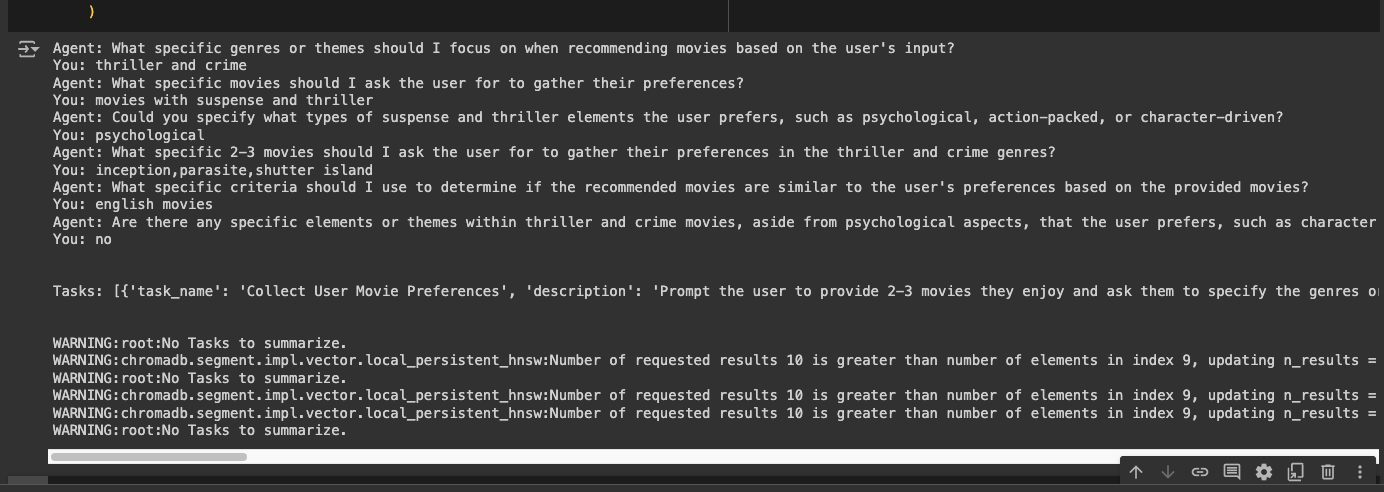
On running this code user input is collected :

<figure><img src="/files/agfDwr4ZUzHGvRCttLM2" alt=""><figcaption></figcaption></figure>

### Output

The output of the script is displayed using the following command:

```python
print("-" * 100)
Console().print(Markdown(res))
```

**Sample Output**

```
----------------------------------------------------------------------------------------------------
┏━━━━━━━━━━━━━━━━━━━━━━━━━━━━━━━━━━━━━━━━━━━━━━━━━━━━━━━━━━━━━━━━━━━━━━━━━━━━━━━━━━━━━━━━━━━━━━━━━━━━━━━━━━━━━━━━━┓
┃                                               Recommended Movies                                                ┃
┗━━━━━━━━━━━━━━━━━━━━━━━━━━━━━━━━━━━━━━━━━━━━━━━━━━━━━━━━━━━━━━━━━━━━━━━━━━━━━━━━━━━━━━━━━━━━━━━━━━━━━━━━━━━━━━━━━┛

Here are some movies you might enjoy:                                                                              

 1 Inception                                                                                                       
   A mind-bending thriller that explores the world of dreams and the subconscious.                                 
 2 The Shawshank Redemption                                                                                        
   A powerful story of hope and friendship set against the backdrop of a maximum-security prison.                  
 3 The Godfather                                                                                                   
   An iconic tale of family, power, and betrayal within the Italian-American mafia.                                
 4 Parasite                                                                                                        
   A darkly comedic thriller that examines class disparity through the lives of two families.                      
 5 Interstellar                                                                                                    
   A visually stunning sci-fi epic about love, sacrifice, and the survival of humanity.                            
 6 The Dark Knight                                                                                                 
   A gripping superhero film that delves into morality through the conflict between Batman and the Joker. 
```

### Conclusion

This documentation illustrates how to use the OpenAGI framework to build an interactive movie recommendation system. By effectively gathering user preferences and leveraging search tools, the system delivers personalized movie suggestions that enhance user engagement and satisfaction.


# JobSearch Agent

It utilize various tools for internet search and document comparison to fulfill its task. Upon finding the relevant job opportunities, The script configures the agent's role, goal, backstory, capabilities, and specific task to accomplish. Additionally, it initializes logging for debugging purposes and triggers the execution of the agent.

**Import Required Libraries**

First, we need to import the necessary modules. Each module serves a specific purpose in our script. We utilize various tools for internet search and document comparison to fulfill the agent's task. Here’s what each import does:

* `GoogleSerpAPISearch` and `DuckDuckGoSearch` are tools for performing web searches.
* `Admin` manages the overall execution of tasks.
* `AzureChatOpenAIModel` is used to configure the large language model from Azure.
* `Memory` is for maintaining context during the agent's operations.
* `TaskPlanner` helps in decomposing tasks into manageable sub-tasks.
* `Worker` represents individual agents with specific roles and responsibilities.
* `Console` and `Markdown` from the `rich` library are used for printing formatted outputs.

```python
from openagi.actions.tools.serp_search import GoogleSerpAPISearch
from openagi.actions.tools.ddg_search import DuckDuckGoSearch
from openagi.agent import Admin
from openagi.llms.azure import AzureChatOpenAIModel
from openagi.memory import Memory
from openagi.planner.task_decomposer import TaskPlanner
from openagi.worker import Worker
from rich.console import Console
from rich.markdown import Markdown
import os
```

**Setup LLM**

Next, we set up the environment variables and configure the Azure OpenAI model. This setup allows us to use Azure's GPT-4 model with the script. Setting up the environment variables ensures the necessary keys and endpoints are accessible during execution.

```python
os.environ["AZURE_BASE_URL"] = "https://<replace-with-your-endpoint>.openai.azure.com/"
os.environ["AZURE_DEPLOYMENT_NAME"] = "<replace-with-your-deployment-name>"
os.environ["AZURE_MODEL_NAME"] = "gpt4-32k"
os.environ["AZURE_OPENAI_API_VERSION"] = "2023-05-15"
os.environ["AZURE_OPENAI_API_KEY"] = "<replace-with-your-key>"

config = AzureChatOpenAIModel.load_from_env_config()
llm = AzureChatOpenAIModel(config=config)
```

**Define Workers**

We define workers with specific roles and instructions. Each worker agent is equipped with the tools necessary to perform their designated tasks. The worker in this script is set up to search for job opportunities using DuckDuckGo.

```
websearcher = Worker(
    role="SW",
    instructions="""
    You are an Expert Python SW Developer with deep knowledge of job markets.
    - Focus on SDE2 (Software Development Engineer II) positions
    - Look for roles requiring 2+ years of Python experience
    - Consider various industries and company sizes
    - Pay attention to job descriptions, required skills, and company culture
    """,
    actions=[DuckDuckGoSearch],
)
```

**Define Admin**

The `Admin` agent manages the workers and executes the tasks. It is configured to use the task planner without human intervention and maintains context using memory.

```python
admin = Admin(
    actions=[DuckDuckGoSearch],
    planner=TaskPlanner(human_intervene=False),
    memory=Memory(),
    llm=llm,
)
admin.assign_workers([websearcher])
```

**Execute Agent LLM**

The admin runs with a specific query to find job opportunities. The query includes detailed instructions on what information to gather and how to present it.

```python
    res = admin.run(
        query="""
        Provide a list of at least 10 SDE2 job opportunities suitable for candidates with 2+ years of Python experience.
        For each job, include:
        1. Company name and location
        2. Job title
        3. Key responsibilities
        4. Required skills
        5. Any standout perks or benefits
        6. Application link or process (if available)
        """,
        description="""
        You are an expert Internet Job Searching agent. Your task is to:
        - Find the most relevant and high-quality job opportunities
        - Ensure jobs match the specified experience level and skill set
        - Provide a diverse range of companies and industries
        - Verify the credibility of job postings
        - Organize the information in a clear, easy-to-read format
        - Highlight any unique or particularly attractive aspects of each role
        """,
    )
```

**Print the Results**

Finally, the results are outputted using the `rich` library, which allows us to print the data in a nicely formatted markdown.

```python
# Print the results from the OpenAGI
print("-" * 100)  # Separator
Console().print(Markdown(res))
```

#### Sample Output

The expected output is a list of job opportunities with detailed descriptions. Each job entry includes the company name, location, job title, responsibilities, required skills, standout perks, and an application link.

```markdown
Job Opportunities and Descriptions in Finance Technology

1. **Strategic Programs Finance Tech Manager** - The Finance technology team supervises a large portfolio of ongoing transformation programs that are each operated by individual teams from Finance, CIO and more. [More details](https://www.accenture.com/in-en/careers/jobdetails?id=R354135_en)

2. **Finance Manager - FinTech** - A professional with 2+ years of experience is needed for end to end Business Finance like Strategic Planning, preparing & managing the finances. [More details](https://iimjobs.com/j/finance-manager-fintech-3-8-yrs-1194909)

3. **Working in Fintech** - Fintech is a combination of finance and technology. This combination has set high standards in the field of employment. [More details](https://imarticus.org/blog/what-is-job-description-to-work-in-fintech-and-what-are-the-skills-required/)

4. **Finance Technology Role** - Discover the typical qualifications and responsibilities for a role in Finance Technology. [More details](https://www.glassdoor.co.in/Career/technology-finance-career_KO0,18.htm)

5. **Strategic Programs Finance Tech Manager - Accenture** - Job Description for Strategic Programs Finance Tech Manager in Accenture in Gurgaon for 7 to 11 years of experience. [More details](https://www.naukri.com/job-listings-strategic-programs-finance-tech-manager-accenture-solutions-pvt-ltd-gurugram-7-to-11-years-020524909932)

6. **Financier Job** - The core responsibilities of finance professionals involve analyzing data, reconciling, providing financial advice, optimizing cash flow, and preparing. [More details](https://emeritus.org/in/learn/financier-job-roles-and-responsibilities/)

7. **12 Finance Tech Jobs** - Lucrative finance tech jobs including Compliance specialist, Cybersecurity specialist, App developer, Automation engineer, UX designer. [More details](https://www.indeed.com/career-advice/finding-a-job/finance-tech-jobs)

8. **FIN-Global Middle Office** - Ability to understand the booking structure for complex trades and raise relevant issues to Product Control management. Good Logical reasoning skills, ability. [More details](https://careers.nomura.com/Nomura/job/Mumbai-FIN-Global-Middle-Office/1128931300/)

9. **Financial Technology jobs in India** - Experience level. Internship (48). Entry level (1,708). Associate (588). Mid-Senior level (5,269). Director (402). [More details](https://in.linkedin.com/jobs/financial-technology-jobs)

10. **Senior Executive/Middle level executive - Mumbai** - The ideal candidate will be responsible for identifying, analyzing, and strategizing the resolution of non-performing assets (NPAs) acquired. [More details](https://www.naukri.com/job-listings-senior-executive-middle-level-executive-acaipl-investment-financial-services-mumbai-3-to-8-years-080524005387)
```

####


# Blog Writing Agent

This example shows how to create an OpenAGI agent with three workers (Research Analyst, Tech Content Strategist, Review and Editing Specialist) to autonomously research, write, and review a blog post.

**Import the Required Modules**

First, import the necessary modules for setting up the agent. These modules include tools for internet searches, content writing, and memory management. The specific tools and classes used are:

```python
from openagi.actions.files import WriteFileAction
from openagi.actions.tools.ddg_search import DuckDuckGoNewsSearch
from openagi.actions.tools.webloader import WebBaseContextTool
from openagi.agent import Admin
from openagi.llms.azure import AzureChatOpenAIModel
from openagi.memory import Memory
from openagi.planner.task_decomposer import TaskPlanner
from openagi.worker import Worker
from rich.console import Console
from rich.markdown import Markdown
```

**Set Up the LLM (Large Language Model)**

To configure the AzureChatOpenAIModel, you need to load the configuration from environment variables. This step ensures that the model can access the necessary endpoints and API keys to function correctly.

```python
os.environ["AZURE_BASE_URL"]="https://<replace-with-your-endpoint>.openai.azure.com/"
os.environ["AZURE_DEPLOYMENT_NAME"] = "<replace-with-your-deployment-name>"
os.environ["AZURE_MODEL_NAME"]="gpt4-32k"
os.environ["AZURE_OPENAI_API_VERSION"]="2023-05-15"
os.environ["AZURE_OPENAI_API_KEY"]=  "<replace-with-your-key>"
​
config = AzureChatOpenAIModel.load_from_env_config()
llm = AzureChatOpenAIModel(config=config)
```

**Define the Team Members**

In this step, create worker agents with specific roles and instructions. Each worker is equipped with tools to perform their designated tasks.

* **Research Analyst:** The Research Analyst conducts research on the latest developments in AI.
* **Tech Content Strategist:** The Tech Content Strategist writes the blog post based on the research.
* **Review and Editing Specialist:** The Review and Editing Specialist reviews and edits the blog post, ensuring clarity and grammatical accuracy.

```python
researcher = Worker(
    role="Research Analyst",
    instructions=""" As a Research Analyst at a leading tech think tank, your task is to uncover cutting-edge developments in AI and data science. Follow these steps:

        1. Identify current hot topics: Use DuckDuckGoNewsSearch to find the latest news in AI and data science.
        2. Analyze trends: Look for patterns and recurring themes in the news results.
        3. Deep dive: For each identified trend, use WebBaseContextTool to gather more in-depth information.
        4. Evaluate impact: Assess the potential implications of each trend on the tech industry.
        5. Prioritize findings: Rank the trends based on their potential impact and novelty.
        6. Compile insights: Summarize your findings, including key statistics and expert opinions.
        7. Identify actionable takeaways: Suggest potential applications or areas for further research.
        8. Prepare a brief: Create a concise report of your findings, focusing on the top 3-5 trends.

        Your output should be a structured report that presents complex data as actionable insights.
        """,
    actions=[
        DuckDuckGoNewsSearch,
        WebBaseContextTool,
    ],
)
writer = Worker(
    role="Tech Content Strategist",
    instructions="""
        As a renowned Content Strategist, your task is to craft compelling content on tech advancements. Follow these steps:

        1. Review the research brief: Carefully read the report provided by the Research Analyst.
        2. Choose an angle: Decide on a unique perspective or narrative approach for the article.
        3. Outline the article: Create a structure that includes an engaging introduction, main body, and conclusion.
        4. Craft the introduction: Write a hook that captures the reader's attention and introduces the main topic.
        5. Develop the main body: For each key point:
        a. Explain the concept in simple terms.
        b. Provide relevant examples or case studies.
        c. Discuss potential implications or applications.
        6. Add expert insights: Incorporate quotes or perspectives from industry experts.
        7. Create visualizations: Suggest infographics or diagrams to illustrate complex ideas.
        8. Write the conclusion: Summarize the main points and provide a forward-looking statement.
        9. Optimize for engagement: Use subheadings, bullet points, and short paragraphs to improve readability.
        10. Review and refine: Do a final pass to ensure the article flows well and maintains reader interest throughout.

        Your output should be the complete article, transforming complex concepts into a compelling narrative.
        """
    actions=[
        DuckDuckGoNewsSearch,
        WebBaseContextTool,
    ],
)
reviewer = Worker(
    role="Review and Editing Specialist",
    instructions="""
        As a meticulous editor with an eye for detail, your task is to review and refine the content to ensure perfection. Follow these steps:

        1. Initial read-through: Read the entire article without making any changes to get an overall sense of the content.
        2. Check for clarity: Identify any sections that may be unclear or confusing to the target audience.
        3. Enhance engagement: Suggest improvements to make the content more captivating and readable.
        4. Grammar and style check: 
        a. Correct any grammatical errors.
        b. Ensure consistent style and tone throughout the article.
        c. Check for proper punctuation and sentence structure.
        5. Fact-checking: Verify key facts and statistics using DuckDuckGoNewsSearch and WebBaseContextTool.
        6. Alignment with company values: Ensure the content reflects the company's stance and values.
        7. SEO optimization: Suggest improvements for search engine visibility without compromising quality.
        8. Formatting review: Check headings, subheadings, and overall structure for consistency and impact.
        9. Final polish: Make any last refinements to enhance the overall quality of the piece.
        10. Prepare for publication: 
            a. Write the final version of the blog post to a file using WriteFileAction.
            b. Generate a brief summary of the changes made and any final recommendations.

        Your output should be the path to the written file containing the perfected blog post, along with your summary of changes and recommendations.
        """
        actions=[
        DuckDuckGoNewsSearch,
        WebBaseContextTool,
        WriteFileAction,
    ],
)
```

**Set Up the Admin**

Configure the Admin to manage and coordinate the tasks. The Admin assigns tasks to the workers and oversees the entire workflow.

```python
admin = Admin(
    planner=TaskPlanner(human_intervene=False),
    memory=Memory(),
    llm=llm,
)
admin.assign_workers([researcher, writer, reviewer])
```

**Run the Task**

The Admin executes the task by providing a query and description. The task involves researching, writing, and reviewing a blog post about the future of AI.

```python
res = admin.run(
    query="Write a blog post about the future of AI.",
    description="""
    Create an engaging blog post about the future of AI based on the latest advancements in 2024. Your task includes:

    1. Research recent AI breakthroughs and identify key trends.
    2. Analyze the potential impacts of these advancements on various industries and daily life.
    3. Write a blog post that:
       - Highlights 3-5 significant AI advancements
       - Explains their importance in simple, accessible terms
       - Discusses potential real-world applications
       - Addresses any relevant ethical considerations
    4. Ensure the post is:
       - Informative yet easy to understand for a tech-savvy audience
       - Engaging and exciting, conveying the wonder of AI's possibilities
       - Written in a conversational tone, avoiding complex jargon
       - Structured with a clear introduction, body, and conclusion
    5. Save the final blog post to a file and return the file path along with a brief summary.

    Feel free to use file writing for maintaining context during your research and writing process.
    """
)
```

**Print the Results**

Finally, print the results from the OpenAGI, displaying the content generated by the agent.

```python
print(res)
```

#### Output

The agent will create a file with the following content:

```vbnet
The Future of AI: Key Trends and Innovations in 2024

Introduction
Artificial Intelligence (AI) continues to transform businesses, industries, and various aspects of our daily lives. As we move into 2024, the advancements in AI are set to shape the future in unprecedented ways. This blog post explores the key trends, breakthrough technologies, and potential industry impacts of AI in 2024.

Key Trends and Breakthrough Technologies
1. **AI Market Growth**: The AI market is projected to reach USD 2575.16 billion by 2032, driven by innovations in educational tools, natural language processing (NLP), and healthcare applications (MSN).
2. **Transformative AI Innovations**: AI is rapidly integrating into various sectors, transforming businesses and industries while raising potential challenges like energy consumption (Forbes).

Industry and Safety Concerns
1. **Transparency and Ethics**: Former OpenAI employees have called for increased transparency and safety measures in AI development, emphasizing the importance of ethical considerations (TechCrunch).
2. **Ethical Use in Legal and Healthcare Sectors**: The ethical use of AI is crucial, particularly in the legal and healthcare sectors, to avoid potential legal implications and ensure quality patient outcomes (Law, Forbes).

Notable Company Announcements and Market Movements
1. **Nvidia's Leadership**: Nvidia's announcements at Computex 2024 highlighted significant AI advancements and partnerships, showcasing their leadership in AI technology (SiliconANGLE).
2. **Market Performance**: Nvidia surpassed Apple in market cap, with both companies reaching a $3 trillion valuation, underscoring Nvidia's dominance in the AI market (MSN).

Sector-Specific Impacts
1. **AI in Finance**: AI is revolutionizing banking and financial software development, enhancing financial services and customer experiences (TechBullion).
2. **AI in Healthcare**: AI holds great potential in healthcare for improving patient outcomes but requires careful implementation and ethical guidelines (Forbes).
3. **AI/ML-Enabled Medical Devices**: Innovators like Tejesh Marsale are leading advancements in AI/ML-enabled medical devices, pushing the boundaries of healthcare technology (TechBullion).

Conclusion
The future of AI in 2024 is marked by rapid advancements, significant market growth, and t
```


# News Agent

Staying current with the latest developments is crucial, especially in the fast-paced world of technology and artificial intelligence. A News Agent can help you stay informed by gathering the latest n

Be upto date on what's happening using News Agent

**Import Required Libraries**

First, import the necessary libraries and modules. These modules will enable the agent to perform web searches, handle task planning, and display results in a readable format.

```python
from openagi.actions.tools.ddg_search import DuckDuckGoSearch
from openagi.agent import Admin
from openagi.llms.azure import AzureChatOpenAIModel
from openagi.planner.task_decomposer import TaskPlanner
from rich.console import Console
from rich.markdown import Markdown
import os
```

**Setup LLM**

Set up the environment variables required for Azure OpenAI configuration. These environment variables include the base URL, deployment name, model name, API version, and API key. This configuration is essential for the Large Language Model (LLM) to function correctly.

```python
os.environ["AZURE_BASE_URL"] = "https://<replace-with-your-endpoint>.openai.azure.com/"
os.environ["AZURE_DEPLOYMENT_NAME"] = "<replace-with-your-deployment-name>"
os.environ["AZURE_MODEL_NAME"] = "gpt4-32k"
os.environ["AZURE_OPENAI_API_VERSION"] = "2023-05-15"
os.environ["AZURE_OPENAI_API_KEY"] = "<replace-with-your-key>"

config = AzureChatOpenAIModel.load_from_env_config()
llm = AzureChatOpenAIModel(config=config)
```

**Define Admin**

Create an Admin instance to manage actions and execute tasks. The Admin will use the DuckDuckGoSearch tool to perform web searches and the TaskPlanner to manage task execution without human intervention.

```python
admin = Admin(
    llm=llm,
    actions=[DuckDuckGoSearch],
    planner=TaskPlanner(human_intervene=False),
)
```

**Execute Agent LLM**

Run the Admin with a specific query to fetch the latest news about AI from the web. In this case, the query is set to find recent news related to "Recent AI News Microsoft." The Admin will process this query and return the relevant news articles.

```python
res = admin.run(
    query="Recent AI News Microsoft",
    description="",
)
```

**Print the Results**

Finally, use the rich library to output the results in a readable format. The Markdown class helps in rendering the news content neatly in the console.

```python
Console().print(Markdown(res))
```

By following these steps, you can set up a News Agent that keeps you updated with the latest news in the field of artificial intelligence. This example uses the power of Azure's GPT-4 model and OpenAGI to perform efficient web searches and present the information in an easily digestible format.

### Sample Output

When the above code is executed, the output in the console might look like this:

```
# Recent AI News from Microsoft

## 1. Microsoft Unveils New AI Features in Office Suite
*Date: August 8, 2024*  
Microsoft has announced the integration of advanced AI features in its Office suite, aiming to enhance productivity and collaboration among users.

## 2. Microsoft AI Research Breakthroughs
*Date: August 7, 2024*  
Recent research from Microsoft AI has shown significant improvements in natural language processing, potentially revolutionizing how machines understand human language.

## 3. Microsoft Partners with OpenAI for New Developments
*Date: August 6, 2024*  
In a strategic partnership, Microsoft and OpenAI are set to collaborate on new AI technologies that promise to push the boundaries of artificial intelligence applications.
```

This output showcases the latest news articles related to Microsoft's developments in artificial intelligence, formatted neatly for readability.


# Itinerary Planner

This example uses OpenAGI to create trip itineraries by leveraging an OpenAI model through an Admin agent, with results displayed using Markdown via the rich library.

**Import Required Libraries**

First, import the necessary libraries and modules. These modules will enable the agent to perform web searches, handle task planning, write files, and display results in a readable format.

```python
from openagi.actions.files import WriteFileAction
from openagi.actions.tools.ddg_search import DuckDuckGoSearch
from openagi.agent import Admin
from openagi.llms.openai import OpenAIModel
from openagi.planner.task_decomposer import TaskPlanner
from rich.console import Console
from rich.markdown import Markdown
import os
```

**Setup LLM**

Set up the environment variables required for the OpenAI configuration. These environment variables include the API key necessary for accessing the OpenAI services. This configuration is essential for the Large Language Model (LLM) to function correctly.

```python
# Set up the environment variables for OpenAI
os.environ["OPENAI_API_KEY"] = "sk-proj-xxxxxxxxxxxxxxxxxx"

# Initialize the OpenAI Model
config = OpenAIModel.load_from_env_config()
llm = OpenAIModel(config=config)
```

**Define Admin**

Create an Admin instance to manage actions and execute tasks. The Admin will use the DuckDuckGoSearch tool to perform web searches, the WriteFileAction to save results, and the TaskPlanner to manage task execution without human intervention.

```python
# Set up the Admin Agent
admin = Admin(
    llm=llm,
    actions=[
        DuckDuckGoSearch,
        WriteFileAction,
    ],
    planner=TaskPlanner(
        human_intervene=False,
    ),
)
```

**Execute Agent LLM**

Run the Admin with a specific query to create an itinerary for a trip to the San Francisco Bay Area. The Admin will process this query and return a detailed itinerary based on the latest information available.

```python
# Execute the Agent to create an itinerary
   response = Admin(actions=[DuckDuckGoSearch]).run(
    query="3 Days Trip to san francisco bay area",
    description="You are a knowledgeable local guide with extensive information about the city, it's attractions and customs",
)
```

**Print the Results**

Finally, use the rich library to output the results in a readable format. The Markdown class helps in rendering the itinerary content neatly in the console.

```python
# Print the results from OpenAGI using rich library
Console().print(Markdown(res))
```

By following these steps, you can set up a News Agent that helps you plan activities or trips effectively. This example uses the power of the OpenAI model and OpenAGI to perform efficient web searches and present the information in an easily digestible format, ensuring you stay informed and well-prepared.

### Sample Output

When this code is executed, the output in the console might resemble the following itinerary:

```
# Itinerary for a 3-Day Trip to San Francisco Bay Area

## Day 1: Explore San Francisco

- **Morning**: Visit the iconic Golden Gate Bridge. Enjoy a walk or rent a bike to cross the bridge for stunning views.
  
- **Afternoon**: Head to Fisherman’s Wharf for lunch. Try the famous clam chowder in a sourdough bread bowl.

- **Evening**: Explore Pier 39, watch the sea lions, and enjoy street performances. Consider dining at one of the waterfront restaurants.

## Day 2: Culture and History

- **Morning**: Visit Alcatraz Island. Book your tickets in advance to explore the historic prison.

- **Afternoon**: Discover the San Francisco Museum of Modern Art (SFMOMA). Enjoy lunch at a nearby café.

- **Evening**: Stroll through the Mission District and enjoy the vibrant murals. Dine at a local taqueria for authentic Mexican food.

## Day 3: Nature and Surroundings

- **Morning**: Take a trip to Muir Woods National Monument. Enjoy a hike among the towering redwoods.

- **Afternoon**: Visit Sausalito for lunch and explore the charming waterfront town.

- **Evening**: Return to San Francisco and enjoy a sunset view from Twin Peaks. Consider a farewell dinner in the city.
```

This output provides a structured and detailed itinerary for a three-day trip to the San Francisco Bay Area, formatted for easy reading.


# Special Mentions

This work would not have been possible without the incredible support from various open source and other open integrations. We especially thank the following open-source tools for their inspiration.

* Langchain
* CrewAI
* AutoGen

Our heartfelt gratitude goes to all the team members at AI Planet for putting this together.


# Contact Us

Please email us at <openagi@aiplanet.com> for any feedback/issues.


# 📝Introduction

At AI Planet, we started OpenAGI to make human-like agents accessible to everyone, thereby paving the way towards open agents and, eventually, AGI for everyone. We strongly believe in the transformative power of AI and believe this initiative will go a long way in solving many real-life problems. In its current form, OpenAGI aims to provide a framework for developers to create autonomous human-like agents.

<figure><img src="/files/Lu6Pu0DmjSkxJYBtAwkT" alt=""><figcaption><p>Simple illustration of how autonomous agents would operate just like humans</p></figcaption></figure>

While the advancement of large language models (LLMs) led to numerous applications based on LLMs, at their core, these are adept at synthesizing and gathering information. On the other hand, agents demonstrate more autonomy; they engage in planning, reasoning, decision-making, and executing actions autonomously. The agents are just like humans, which will learn, improve, and become autonomous over time.

With OpenAGI, we aim to provide developers and organizations with the flexibility to build specialized agents that automate and solve complex problems. Agent use cases extend to various industries, they could include basic agents such as researching a topic, automating test cases, writing documentation for production code, and personalizing learning.

* **Education:** In education, agents can provide personalized learning experiences. They adapt and tailor learning content based on student's progress, performance and interests. It can extend to automating various other administrative tasks and assist teachers in improving their productivity.
* **Finance and Banking:** Financial services can use agents for fraud detection, risk assessment, personalized banking advice, automating trading, and customer service. They help in analyzing large volumes of transactions to identify suspicious activities and offer tailored investment advice.
* **Healthcare:** Agents can be deployed to monitor patients, provide personalized health recommendations, manage patient data, and automate administrative tasks. They can also assist in diagnosing diseases based on symptoms and medical history.

**The scope in the near future:**

We've been talking a lot about how these agents can get better by thinking about what they've done, learning from both humans and other peer agents via reflection of feedback, self-critics etc. This helps them improve and work more independently over time.

For example, we're thinking about tuning the platform in such a way that would enable developers to making agents that are really good at specific tasks over a period of time. For example: A specialized front-end developer with expertise in ReactJS. Just like human developers do, by working on many projects, these agents can learn and reuse what they've learned. They'll get better by thinking about their work, learning from feedback, and always trying to find the best solution.

Right now, we're just starting, and the agents can't remember things for a long time or plan ahead very well.  But these should get better soon. We're excited about the future and believe that our work will make open agents accessible for everyone, thereby solving meaningful real-life problems.

Below is a summary of the comparison between the capabilities of LLM apps and agents.

| Feature                  | LLM applications                                                         | Agents/Assistants                                                                                      |
| ------------------------ | ------------------------------------------------------------------------ | ------------------------------------------------------------------------------------------------------ |
| **Core Function**        | Aggregating and synthesizing information from existing data.             | Planning, reasoning, decision-making, and executing actions autonomously.                              |
| **Learning Method**      | Supervised and unsupervised learning from vast datasets.                 | Continual learning from new experiences and adapting over time without explicit retraining.            |
| **Decision Making**      | Limited to choosing responses based on probability and patterns in data. | Complex decision-making involving ethics, long-term planning, and unforeseen situations.               |
| **Autonomy**             | Operates within the scope defined by its programming and data.           | High degree of autonomy, capable of setting goals and pursuing them independently.                     |
| **Physical Interaction** | Generally, none, as it focuses on digital and informational tasks.       | Direct interaction with the physical world, including manipulation of objects and navigation in space. |

#### Features of OpenAGI

* **Flexible Agent Architecture**: OpenAGI features a flexible agent architecture, allowing users to easily create sequential, parallel, and dynamic communication patterns. This flexibility is designed to help users efficiently tackle their unique challenges.
* **Streamlined Integration and Configuration**: OpenAGI introduces simplified integration and configuration processes, eliminating the infinite loops commonly encountered in other tools.
* **Automated & Manual Agent Configuration Generation**: We provide the functionality to automatically generate the necessary configurations for building agents and their corresponding configurations. For developers preferring a hands-on approach, OpenAGI supports the manual configuration of agent solutions. This allows for detailed customization according to specific needs and preferences.


# 🔧 Installation

To install OpenAGI, lets practice some best practice by creating a virtual environment and installing the package.

#### Setup a virtual environment

```bash
# For Mac users
python3 -m venv venv
source venv/bin/activate

# For Windows users
python -m venv venv
venv/scripts/activate

# to create virtual env using particular python version (in Windows)
py -3.11 -m venv venv
```

#### Install the Package

```bash
pip install openagi
```


# 🚀 Quickstart

Lets build our first Agent use cases.

In this quickstart, we'll explore one of the use cases to demonstrate the execution of the Agent. We'll focus on querying Search Engines tools like `DuckDuckGoSearchTool` to gather the  information on 3 Days Trip to San Francisco and Bay area based on recent days.&#x20;

Agents excel at autonomously performing multiple tasks, making decisions on the fly, and communicating with other agents. For this use case, we will let `Admin` Agent to auto-decompose or `Plan` the task and use tools as the supported `Actions`.&#x20;

### 1. Import required modules

To get started, we need to initialize a few methods from the modules.

* Admin
* Worker
* Action
* Large Language Model
* Memory
* Planner

```python
from openagi.agent import Admin
from openagi.worker import Worker
from openagi.actions.files import WriteFileAction
from openagi.actions.tools.ddg_search import DuckDuckGoNewsSearch
from openagi.actions.tools.webloader import WebBaseContextTool
from openagi.llms.openai import OpenAIModel
from openagi.memory import Memory
from openagi.planner.task_decomposer import TaskPlanner
```

### 2. Setting LLM configuration

To authenticate your requests to the OpenAI API (by default OpenAI Model will be used), you need to set your API key as an environment variable. This is essential for ensuring secure and authorised access to the API services.&#x20;

```python
import os
os.environ["OPENAI_API_KEY"] = "sk-proj-xxxxxxxxxxxxxxxxxx"

config = OpenAIModel.load_from_env_config()
llm = OpenAIModel(config=config)
```

Replace `sk-proj-xxxxxxxxxxxxxxxxxx` with your actual OpenAI API key.

### 3. Setup Workers with Tools and Action

Workers are specialized classes tasked with executing the assignments given by the "Admin" class. They use tools such as internet news search engines, LLMs, and document writers to complete their tasks, individually and in cohesion (for complex tasks like writing blog articles).

An action is a functionality that enables the Agent to fetch, process, and store data for further analysis and decision-making.

* `DuckDuckGoNewsSearch`: This tool fetches real-time news data using the DuckDuckGo search engine, providing up-to-date information.
* `WebBaseContextTool`: This tool is used to extract information from Web Pages. It also provides a way to load and optionally summarize the content of a webpage.
* `WriteFileAction`: This action saves the written file to the specified location, ensuring data persistence.

```python
# Declare the Worker objects

# Initialize the researcher who uses DuckDuckGo to search a topic and extract information from the web pages.
researcher = Worker(
    role="Researcher",
    instructions="sample instruction.",
    actions=[
        DuckDuckGoNewsSearch,
        WebBaseContextTool,
    ],
)
# initialize the writer who writes the content of the topic using the tools provided
writer = Worker(
    role="Writer",
    instructions="sample instruction.",
    actions=[
        DuckDuckGoNewsSearch,
        WebBaseContextTool,
    ],
)
# initialize the reviewer who reviews the content written by the writer and saves the content into a file using the write file action tool.
reviewer = Worker(
    role="Reviewer",
    instructions="sample instruction.",
    actions=[
        DuckDuckGoNewsSearch,
        WebBaseContextTool,
        WriteFileAction,
    ],
)
```

### 4. Execute the Admin Agent

The Admin Agent serves as the central part for decision-maker, comprehending task specifications in form of supported actions and executing them in a human-like manner.

In order to execute the agent, user needs to specify their query and description to get the response from the Admin agent.&#x20;

```python
# define the Admin with Planner, Memory and LLM. Further assign the workers in order
admin = Admin(
    planner=TaskPlanner(human_intervene=False),
    memory=Memory(),
    llm=llm,
)

# Assign sub-tasks to workers
admin.assign_workers([researcher, writer, reviewer])

result = admin.run(
    query="Write an article on places to visit in Spain.",
    description="You are a knowledgeable local guide with extensive information about Spain, its attractions and customs.",
)

print(result)
```


# 👨‍💼 Admin

## What is an Admin?

Imagine Admin as the master task executor who is responsible for all the major configurations for the execution. From planning of tasks to execution, and defining the brain which is what LLM to use and whether or not to use memory.&#x20;

Admin is the decision-maker that understand the specifications of tasks and execute them in a more human-like manner.&#x20;

## Attributes

The `Admin` class in the `openagi` library is a central component designed to manage and orchestrate various functionalities within the framework. Below is a detailed explanation of its components, attributes, and usage.

The `Admin` class in the OpenAGI framework can be considered an Agent.&#x20;

<table><thead><tr><th width="179">Attribute</th><th width="179">Optional Parameter</th><th>Description</th></tr></thead><tbody><tr><td><strong>planner</strong></td><td></td><td>Help us define the type of planner we can use to decompose the given task into sub tasks.</td></tr><tr><td><strong>llm</strong></td><td></td><td>Users can provide an LLM of their choosing, or use the default one.</td></tr><tr><td><strong>memory</strong></td><td>Yes</td><td>Users can initiate Admin memory, to recall and remember the task and it's response</td></tr><tr><td><strong>actions</strong></td><td></td><td>Admin can be given access to various actions to perform it's task, such as SearchAction, Github Action, etc.</td></tr><tr><td><strong>output_format</strong></td><td>Yes</td><td>Users can define the output format as either "markdown" or "raw_text"  </td></tr><tr><td><strong>max_steps</strong></td><td>Yes</td><td>The number of iterations admin can perform to obtain appropriate output.</td></tr></tbody></table>

### Code Snippet

<pre class="language-python"><code class="lang-python">from openagi.agent import Admin

<strong>admin = Admin(
</strong>    llm=llm,
    actions=actions,
    planner=planner,
)
</code></pre>

Below we have shown how one can initiate and run a simple admin query.

```python
# imports
from openagi.agent import Admin
from openagi.llms.openai import OpenAIModel
from openagi.planner.task_decomposer import TaskPlanner
from openagi.actions.tools.ddg_search import DuckDuckGoSearch
from openagi.memory import Memory

# Define LLM
config = OpenAIModel.load_from_env_config()
llm = OpenAIModel(config=config)

# declare the Admin
admin = Admin(
    llm=llm,
    actions=[DuckDuckGoSearch],
    planner=TaskPlanner(human_intervene=False),
    memory=Memory(),
    output_type=OutputFormat.markdown, # Defaults to markdown
)

# execute the task
res = admin.run(
            query="sample query",
            description="sample description",
            )
```


# 👷 Workers

### What is a Worker?

Workers are special type of classes, responsible for carrying out the tasks assigned by the class "Admin". They utilize tools such as internet search engines, LLMs, and document writers to perform their tasks. Additionally, they can determine which tools to use from a predefined set.

Similarly to how a large task like writing a blog is decomposed into smaller steps such as researching, drafting, and publishing, the admin can define a large task and split it into smaller tasks that are then assigned to the workers.

### Attributes

Workers possess attributes that facilitate the execution and completion of smaller, independent tasks.

<table><thead><tr><th width="160">Attribute</th><th width="204">Optional Parameter</th><th>Description</th></tr></thead><tbody><tr><td>role</td><td></td><td>It is a string input that defines the Functionality or Responsibility of the worker. </td></tr><tr><td>instructions</td><td></td><td>A paragraph about how the LLM should behave related to its role can also include the backstory and other relevant details that might aid in generating the output.</td></tr><tr><td>actions</td><td>Yes</td><td>This configurable parameter takes a list that lets us specify the set of tools available to the worker. The worker may or may not use these tools. If no tools are specified, or if the action list is empty, the worker defaults to the actions set by the admin.</td></tr><tr><td>llm</td><td>Yes</td><td>This parameter is configurable, allowing the worker to either use a specified LLM or default to the LLM designated by the admin.</td></tr><tr><td>max_iterations</td><td>Yes</td><td>This parameter specifies the maximum number of iterations, as an integer, allowed to achieve the objective of the given task.</td></tr><tr><td>force_output</td><td>Yes</td><td>This boolean parameter determines whether to force an output or answer after reaching the maximum iteration limit.</td></tr></tbody></table>

### Code Snippet

The primary components,`TaskWorker`, provide a structured way to define and execute tasks. The `TaskWorker` class specializes in executing specific tasks assigned by the planner.

```python
from openagi.worker import Worker

worker = Worker(
        role=role,
        instructions=instructions,
        actions=actions,
        llm=llm,
        max_iterations=max_iterations,
        force_output=force_output
    )
```

Below we have shown how one can initiate and run a simple admin-worker query.

```python
# import the required packages
from openagi.actions.files import WriteFileAction
from openagi.actions.tools.ddg_search import DuckDuckGoNewsSearch
from openagi.actions.tools.webloader import WebBaseContextTool
from openagi.agent import Admin
from openagi.llms.azure import AzureChatOpenAIModel
from openagi.memory import Memory
from openagi.planner.task_decomposer import TaskPlanner
from openagi.worker import Worker

# configure the LLM
config = AzureChatOpenAIModel.load_from_env_config()
llm = AzureChatOpenAIModel(config=config)

# Declare the Worker objects

# Initialize the researcher who uses DuckDuckGo to search a topic and extract information from the web pages.
researcher = Worker(
    role="Researcher",
    instructions="sample instruction.",
    actions=[
        DuckDuckGoNewsSearch,
        WebBaseContextTool,
    ],
)
# initialize the writer who writes the content of the topic using the tools provided
writer = Worker(
    role="Writer",
    instructions="sample instruction.",
    actions=[
        DuckDuckGoNewsSearch,
        WebBaseContextTool,
    ],
)
# initialize the reviewer who reviews the content written by the writer and saves the content into a file using the write file action tool.
reviewer = Worker(
    role="Reviewer",
    instructions="sample instruction.",
    actions=[
        DuckDuckGoNewsSearch,
        WebBaseContextTool,
        WriteFileAction,
    ],
)

# declare the Admin object with Task Planner, Memory, and LLM
admin = Admin(
    planner=TaskPlanner(human_intervene=False),
    memory=Memory(),
    llm=llm,
)

# Assign sub-tasks to workers
admin.assign_workers([researcher, writer, reviewer])

# run the admin object
res = admin.run(
    query="Write a blog post.",
    description="sample description.",
)
```


# 🗂 Planner

## What is Planner?

Planner is one of the important component of any Agent framework, which enables the agent to divide a task into multiple subtasks based on the requirement. We call this step as **Task Decomposition.**&#x20;

The `Planner` in the `OpenAGI` contains essential modules and components that handle task planning and decomposition. These components are designed to work together to break down complex tasks into manageable sub-tasks, which are then executed by Admin.&#x20;

Below is a detailed explanation of the attributes and functionality of the modules within the  `Planner`.

## Attributes

<table><thead><tr><th width="185">Parameter</th><th width="195">Optional Parameter</th><th>Description</th></tr></thead><tbody><tr><td>human_intervene</td><td>No</td><td>It indicates the framework that after generating output, it should ask human for feedback and make changes to output based on that.</td></tr><tr><td>autonomous</td><td>No</td><td>Autonomous will self assign role and instructions and divide it among the workers. The default is `False`</td></tr><tr><td>input_action</td><td>Yes</td><td>It shows how user can provide feedback to the Admin during execution.</td></tr><tr><td>prompt</td><td>Yes</td><td>An optional prompt to be used for task planning.</td></tr><tr><td>workers</td><td>Yes</td><td>Workers can represent different agents or processes that handle specific subtasks, enabling parallel execution and improving efficiency. If no workers are specified, the planner will operate without additional parallel processing capabilities.</td></tr><tr><td>llm</td><td>Yes</td><td>This parameter allows the user to specify the Large Language Model (LLM) that will be used for generating responses and planning tasks.</td></tr><tr><td>retry_threshold</td><td>Yes</td><td>This parameter defines the maximum number of times the planner will attempt to retry a task if it fails to execute successfully. The default value is <code>3.</code></td></tr></tbody></table>

&#x20;&#x20;

### Code Snippet

The primary component, `TaskPlanner`, allows for the decomposition of tasks into smaller sub-tasks and the planning of their execution. This modular approach facilitates efficient task management and execution within the OpenAGI framework.

```python
from openagi.planner.task_decomposer import TaskPlanner

planner = TaskPlanner(human_intervene=False)
# make TaskPlanner autonomous = True for auto creating workers
# Autonomous Multi Agent Architecture
# plan = TaskPlanner(autonomous=True,human_intervene=True)
```

Below we have shown how one can initiate and run using  query.

```python
# imports
from openagi.agent import Admin
from openagi.llms.openai import OpenAIModel
from openagi.planner.task_decomposer import TaskPlanner
from openagi.actions.tools.ddg_search import DuckDuckGoSearch

# Define LLM
config = OpenAIModel.load_from_env_config()
llm = OpenAIModel(config=config)

# Planner Usage
admin = Admin(
    llm=llm,
    actions=[DuckDuckGoSearch],
    planner=TaskPlanner(human_intervene=False),
)

# Run Admin
res = admin.run(
            query="sample query",
            description="sample description",
            )
```


# 🧠 LLM

Large Language Models (LLMs) serve as the backbone for executing Agentic workflows. LLMs excel at generating responses and, when combined with human-like planning, reasoning, and task decomposition, give rise to the concept of Agents. In OpenAGI, LLMs plan and reason to decompose task objectives into sub-tasks. They then execute these sub-tasks and return meaningful responses to the user.&#x20;

LLMs can be implemented within the Admin and utilize a Planner to execute tasks. Currently, OpenAGI supports two LLMs: OpenAI and Azure ChatOpenAI models.

### OpenAI Model

OpenAGI supports the GPT-3.5 model by default, represented as OpenAGI. To initialise this model, you need to insert the OpenAI API key inside the environment file and pass the configuration details as parameters to execute the LLM.

```python
import os
from openagi.llms.openai import OpenAIModel

os.environ['OPENAI_API_KEY'] = "sk-<replace-with-your-key>"

config = OpenAIModel.load_from_env_config()
llm = OpenAIModel(config=config)
```

### Azure ChatOpenAI Model

For a Large Language Model, context length is crucial. To utilize a large context, such as 32K from GPT-4, we employ the AzureOpenAI chat model. To initialise this model, you need to insert the parameter configuration inside the environment file and pass the configuration details as parameters to execute the LLM.

```python
import os
from openagi.llms.azure import AzureChatOpenAIModel

os.environ["AZURE_BASE_URL"]="https://<replace-with-your-endpoint>.openai.azure.com/"
os.environ["AZURE_DEPLOYMENT_NAME"] = "<replace-with-your-deployment-name>"
os.environ["AZURE_MODEL_NAME"]="gpt4-32k"
os.environ["AZURE_OPENAI_API_VERSION"]="2023-05-15"
os.environ["AZURE_OPENAI_API_KEY"]=  "<replace-with-your-key>"

config = AzureChatOpenAIModel.load_from_env_config()
llm = AzureChatOpenAIModel(config=config)
```

### Groq Model

Groq is an inference engine specifically designed for applications requiring low latency and rapid responses. It uses open-source models such as Mistral, Gemma, and Llama 2, delivering hundreds of tokens per second, making it faster than other models. To initialize this model, you need to insert the Groq API key along with the model name and temperature in the environment variables.

Get the API key from here: <https://console.groq.com/keys>

```python
import os
from openagi.llms.groq import GroqModel

os.environ['GROQ_API_KEY'] = '<groq-api-key>'
os.environ['GROQ_MODEL'] = '<model-name>'
os.environ['GROQ_TEMP'] = '<temperature>'

config = GroqModel.load_from_env_config()
llm = GroqModel(config=config)
```

### Gemini Model

This model includes the Gemini family models from Google, which includes `Gemini-1.0-pro` and `Gemini-pro`.  To initialize this model, you need to insert the Google API key along with the model name and the temperature.

Get the API key from here: <https://ai.google.dev/>

```python
import os
from openagi.llms.gemini import GeminiModel

os.environ['GOOGLE_API_KEY'] = '<google-api-key>'
os.environ['Gemini_MODEL'] = '<model-name>'
os.environ['Gemini_TEMP'] = '<temperature>'

config = GeminiModel.load_from_env_config()
llm = GeminiModel(config=config)
```

### Ollama Model

Ollama allows you to run models locally, providing a straightforward way to integrate them into your applications.**Installation Steps:**

1. **Download Ollama**: Visit [Ollama's download page](https://ollama.com/download) to get the appropriate version for your operating system (macOS, Linux, or Windows).
2. **Install Ollama**: Use the following command to install Ollama via pip:

   ```
   pip install ollama
   ```

**Basic Ollama Commands:**

* To load the Llama2 model locally:

  ```
  ollama pull mistral
  ```
* To load the Gemma model locally:

  ```
  ollama pull gemma
  ```
* To display all the models that are installed:

  ```
  ollama list
  ```

For more commands, refer to the [Ollama GitHub repository](https://github.com/ollama/ollama).

**Running the Model:**&#x42;efore executing the Ollama model, ensure that the model is running locally in your terminal. You can start the Llama2 model with the following command:

```
ollama run mistral
```

This setup allows you to utilize the Ollama model effectively within your applications, similar to other models supported by OpenAGI. This format aligns with the existing documentation style and provides clear instructions for users to get started with the Ollama model.

```python
import os
from openagi.llms.ollama  import OllamaModel

os.environ['OLLAMA_MODEL'] = "mistral"

config = OllamaModel.load_from_env_config()
llm = OllamaModel(config=config)
```

### SambaNova Model

SambaNova provides high-performance cloud AI services with support for various LLM models including Meta's Llama family. To initialize this model, you need to configure several parameters including the API key, base URL, and project ID. The model supports advanced parameters like temperature, max tokens, and top\_p for fine-tuned control over the generation process.

```python
import os
from openagi.llms.sambanova import SambaNovaModel

os.environ['SAMBANOVA_API_KEY'] = '<your-api-key>'
os.environ['SAMBANOVA_BASE_URL'] = '<your-base-url>'
os.environ['SAMBANOVA_PROJECT_ID'] = '<your-project-id>'
os.environ['SAMBANOVA_MODEL'] = 'Meta-Llama-3.3-70B-Instruct'  # default model
os.environ['SAMBANOVA_TEMPERATURE'] = '0.7'  # default temperature
os.environ['SAMBANOVA_MAX_TOKENS'] = '1024'  # default max tokens
os.environ['SAMBANOVA_TOP_P'] = '0.01'  # default top_p
os.environ['SAMBANOVA_STREAMING'] = 'False'  # default streaming setting

config = SambaNovaModel.load_from_env_config()
llm = SambaNovaModel(config=config)

```

### Cerebras Model

Cerebras offers cloud AI services with access to various LLM models. The platform provides access to different versions of the Llama model family. To initialize this model, you need to provide your API key and can optionally configure the model name and temperature settings.

```python
import os
from openagi.llms.cerebras import CerebrasModel

os.environ['CEREBRAS_API_KEY'] = '<your-api-key>'
os.environ['Cerebras_MODEL'] = 'llama3.1-8b'  # default model
os.environ['Cerebras_TEMP'] = '0.7'  # default temperature

config = CerebrasModel.load_from_env_config()
llm = CerebrasModel(config=config)
```


# 🔧 Action

### What is Action?

Actions provide predefined functionalities that the Agent can invoke to accomplish various tasks. These tasks include fetching data from external sources, processing the data to extract meaningful insights, and storing the results for subsequent use.&#x20;

The Agent invokes actions during its runtime to execute specific tasks. For example, when a user queries the agent, the agent might use a search action to gather information and then a processing action to analyze it

### Attributes

The parameter attributes for Actions is dynamic and it varies based on the different use cases. One can directly pass the supported tools, files as list for defining the actions.&#x20;

### Code Snippet

```python
from openagi.actions.files import WriteFileAction
from openagi.actions.tools.ddg_search import DuckDuckGoSearch

actions = [
        DuckDuckGoSearch,
        WriteFileAction,
] 
```


# 🛠️ Tools

## What is Tool?

Tool is a functionality based on which the data is fetched to the Agent for further analysis and decision making. A wide array of tools is cataloged in the tools database, designed to support activities such as internet searches, email dispatch, interactions with Git repositories, and much more. Users have the flexibility to create their own tools and seamlessly integrate them into the framework's operations.

> Note: Some of the tools are not pre-installed with the OpenAGI library. If you encounter an `OpenAGIException` due to an Import Error, you'll need to manually install the required package to use the tool.

## Tool configuration

### 1. DuckDuckGoSearch Tool

The DuckDuckGoSearch tool is a tool that can be used to search for words, documents, images, videos, news, maps and text translation using the DuckDuckGo.com search engine. DuckDuckGo Search is a web search engine that *DuckDuckGo* is an independent Google alternative that lets you search and browse the web, but it emphasises protecting user privacy and avoiding the filter bubble of personalised search results.

```python
from openagi.actions.tools.ddg_search import DuckDuckGoSearch

# Initialize the DuckDuckGo search tool
ddg_tool = DuckDuckGoSearch(
    query="Your search query"  # Required: The search term to look up
)

# Execute the search
result = ddg_tool.execute()
# Returns search results including web pages and content
```

### 2. Serper Search Tool

Serper is a low-cost Google Search API that can be used to add answer box, knowledge graph, and organic results data from Google Search. This tool is mainly helps user to query the Google results with less throughput and latency.&#x20;

**Setup API**

There are two ways to configure the API key:

1. Using the recommended configuration method:

```python
from openagi.actions.tools.serper_search import GoogleSerpAPISearch
GoogleSerpAPISearch.set_config(api_key='your-api-key')
```

2. Using environment variables (deprecated):

```python
import os
os.environ['GOOGLE_SERP_API_KEY'] = "<replace-with-your-api-key>"
```

Get your API key: <https://serper.dev/>

Usage:

```python
from openagi.actions.tools.serp_search import GoogleSerpAPISearch

# Initialize the Serper search tool
serp_tool = GoogleSerpAPISearch(
    query="Your search query",  # Required: The search query to look up
    max_results=10             # Optional: Number of results to return (default: 10)
)

# Execute the search
result = serp_tool.execute()
# Returns formatted search results with titles, snippets, and URLs
```

The tool requires the following parameters:

* `query`: The search query string to look up on Google
* `max_results`: (Optional) Number of results to return, defaults to 10

The tool will return search results including titles, snippets, and URLs from Google search results.&#x20;

### 3. Google Search Tool

The Google Search Tool enables searching and extracting information from Google search results using the googlesearch-python library. This tool provides a simple way to scrape Google search results without requiring an API key.

**Installation**

```bash
pip install googlesearch-python
```

Usage:

```python
from openagi.actions.tools.google_search_tool import GoogleSearchTool

# Initialize the Google search tool
google_tool = GoogleSearchTool(
    query="Your search query",          # Required: The search query to look up
    max_results=10,                     # Optional: Number of results (default: 10, max: 15)
    lang="en"                           # Optional: Language for search results (default: "en")
)

# Execute the search
result = google_tool.execute()
# Returns formatted search results with titles, descriptions, and URLs
```

### 4. SearchApiSearch

[SearchApi.io](https://searchapi.io/) provides a real-time API to access search results from Google (default), Google Scholar, Bing, Baidu, and other search engines. Any existing or upcoming SERP engine that returns `organic_results` is supported. The default web search engine is `google`, but it can be changed to `bing`, `baidu`, `google_news`, `bing_news`, `google_scholar`, `google_patents`, and others.

**Setup API Key**

There are two ways to configure the API key:

1. Using the recommended configuration method:

```python
from openagi.actions.tools.searchapi_search import SearchApiSearch
SearchApiSearch.set_config(api_key='your-api-key', engine='google')  # engine is optional
```

2. Using environment variables (deprecated):

```python
import os
os.environ['SEARCHAPI_API_KEY'] = "<replace-with-your-api-key>"
```

Get your API key from [SearchApi.io](vscode-file://vscode-app/Applications/Aide.app/Contents/Resources/app/out/vs/code/electron-sandbox/workbench/workbench.html).

Usage:

```python
from openagi.actions.tools.searchapi_search import SearchApiSearch

# Configure API key (recommended way)
SearchApiSearch.set_config(api_key='your-api-key', engine='google')

# Initialize the SearchAPI tool
search_api_tool = SearchApiSearch(
    query="Your search query"  # Required: The search query to look up
)

# Execute the search
result = search_api_tool.execute()
# Returns search results from the configured search engine
```

The tool requires the following parameter:

* `query`: The search query string to look up

The tool will return search results including titles, snippets, and URLs from the configured search engine (defaults to Google).

Supported search engines include:

* Google (default)
* Google Scholar
* Bing
* Baidu
* Google News
* Bing News
* Google Patents

### 5. Github Search Tool

The Github SearchTool is used for retrieving information from Github repositories using natural language queries. This tool provides functionality for querying Github repositories for various information, such as code changes, commits, active pull requests, issues, etc., using natural language input. It is designed to be used as part of a larger AI-driven agent system.

#### Setup API

```python
import os

os.environ['GITHUB_ACCESS_TOKEN'] = "<add-your-access-token>"
```

Get your GitHub Access Token: <https://docs.github.com/en/authentication/keeping-your-account-and-data-secure/managing-your-personal-access-tokens>

```python
from openagi.actions.tools.github_search_tool import GitHubFileLoadAction

# Set GitHub access token in environment
import os
os.environ['GITHUB_ACCESS_TOKEN'] = "<your-github-token>"

# Initialize the GitHub search tool
github_tool = GitHubFileLoadAction(
    repo="username/repository",  # e.g., "aiplanethub/openagi"
    directory="path/to/files",   # e.g., "src/openagi/llms"
    extension=".py"              # File extension to filter
)

# Execute the search
result = github_tool.execute()
# Returns content and metadata of matching files
```

### 6. YouTube Search Tool

The YouTube Search tool allows users to search for videos on YouTube using natural language queries. This tool retrieves relevant video content based on user-defined search parameters, making it easier to find specific videos or topics of interest.

The YouTube Search tool does not require an API key but does require the installation of specific libraries. You need to install `yt-dlp` and `youtube-search` to use this tool.

```
pip install yt-dlp
pip install youtube-search
```

**Code Snippet** To initialize the YouTube Search tool, you can use the following code:

```python
from openagi.actions.tools.youtubesearch import YouTubeSearchTool

# Initialize the YouTube search tool
youtube_tool = YouTubeSearchTool(
    query="Your search query",  # Required: The keyword to search for
    max_results=5              # Optional: Number of results to return (default: 5)
)

# Execute the search
result = youtube_tool.execute()
# Returns video titles, descriptions, and URLs
```

The tool requires the following parameters:

* `query`: The search keyword or phrase to look up on YouTube
* `max_results`: (Optional) Number of video results to return, defaults to 5

The tool will return search results including:

* Video titles
* Video descriptions
* Video URLs (in format: [https://youtube.com/watch?v=VIDEO\_ID](vscode-file://vscode-app/Applications/Aide.app/Contents/Resources/app/out/vs/code/electron-sandbox/workbench/workbench.html))

### 7. Tavily QA Search Tool

The Tavily QA Search tool is designed to provide answers to user queries by fetching data from various online sources. This tool enhances the capability of the agent to retrieve precise information and answer questions effectively.

**Installation**

```
pip install tavily-python
```

For the Tavily QA Search tool, you also need to set up the API key in your environment variables:

```python
import os

# Set the Tavily API key in the environment variable
os.environ['TAVILY_API_KEY'] = "<replace-with-your-tavily-api-key>"
```

**Code Snippet** To initialize the Tavily QA Search tool, you can use the following code:

```python
from openagi.actions.tools.tavilyqasearch import TavilyWebSearchQA

# Configure API key (recommended way)
TavilyWebSearchQA.set_config(api_key='your-api-key')

# Initialize the Tavily QA search tool
tavily_tool = TavilyWebSearchQA(
    query="Your search query"  # Required: The question or query to search for
)

# Execute the search
result = tavily_tool.execute()
# Returns AI-generated answers based on web content
```

The tool requires the following parameter:

* `query`: The search query or question to look up

The tool will return comprehensive search results with AI-generated answers based on the most relevant web content found.&#x20;

### 8. Exa Search Tool

The Exa Search tool allows users to query the Exa API to retrieve relevant responses based on user-defined questions. This tool is particularly useful for extracting information and insights from various data sources using natural language queries.

**Installation**

```
pip install exa-py
```

To use the Exa Search tool, you need to set up the API key in your environment variables. Here’s how to do that:

```python
import os

# Set the Exa API key in the environment variable
os.environ['EXA_API_KEY'] = "<replace-with-your-exa-api-key>"
```

**Code Snippet**

```python
from openagi.actions.tools.exasearch import ExaSearch

# Configure API key (recommended way)
ExaSearch.set_config(api_key='your-api-key')

# Initialize the Exa search tool
exa_tool = ExaSearch(
    query="Your search query"  # Required: The search query to look up
)

# Execute the search
result = exa_tool.execute()
# Returns relevant content from search results
```

### 9. Unstructured PDF Loader Tool

The Unstructured PDF Loader tool is designed to extract content, including metadata, from PDF files. It utilizes the Unstructured library to partition the PDF and chunk the content based on titles. This tool is useful for processing large volumes of PDF documents and making their contents accessible for further analysis.

**Installation**

```
pip install unstructured
```

**Code Snippet**

```python
from openagi.actions.tools.unstructured_io import UnstructuredPdfLoaderAction

# Initialize the PDF loader tool with configuration
pdf_tool = UnstructuredPdfLoaderAction()
pdf_tool.set_config(filename="/path/to/your/file.pdf")

# Execute the loader
result = pdf_tool.execute()
# Returns structured content from PDF including metadata
```

### 10. Wikipedia Search Tool

The Wikipedia Search tool enables searching and retrieving information from Wikipedia articles. This tool provides functionality to search Wikipedia articles and retrieve summaries, with built-in handling for disambiguation pages.

**Installation**

```
pip install wikipedia-api
```

**Usage Example**

```python
from openagi.actions.tools.wikipedia_search import WikipediaSearch

# Initialize the Wikipedia search tool
wikipedia_tool = WikipediaSearch(
    query="Your search query",          # Required: The search query to look up
    max_results=3                       # Optional: Number of sentences to return (default: 3)
)

# Execute the search
result = wikipedia_tool.execute()
# Returns JSON string containing title, summary, and URL or disambiguation options

```

### 11. ElevenLabsTTS Tool

This tool is designed to seamlessly convert text to speech using ElevenLabs, allowing you to utilize any voice ID or customization options provided by the platform. It leverages the ElevenLabs API to transform the input text into speech, offering high-quality, multilingual text-to-speech conversions.

```
pip install elevenlabs
```

Usage:

```python
import os
import json
from elevenlabs.client import ElevenLabs
from elevenlabs import play
from src.openagi.actions.tools.speech_tool import ElevenLabsTTS  

# Set your ElevenLabs API Key (Optional: Can also be set in .env file)
os.environ["ELEVENLABS_API_KEY"] = "your_api_key_here"

# Create an instance of ElevenLabsTTS
tts = ElevenLabsTTS(
    text="Hello, this is a test of ElevenLabs text-to-speech.",
    voice_id="JBFqnCBsd6RMkjVDRZzb",
    model_id="eleven_multilingual_v2",
    output_format="mp3_44100_128",
)

# Execute the text-to-speech conversion
response = tts.execute()

# Print the response
print(json.loads(response))
```

### How to build a custom Tool?

In OpenAGI, building a custom tool is straightforward by wrapping your custom logic inside a class that inherits from `BaseAction` and implementing the `execute` method. This setup allows you to encapsulate the necessary configurations and operations within the custom tool, making it easy to integrate and use within the OpenAGI framework.

#### Syntax

1. **Import Necessary Modules:**
   * Begin by importing the necessary modules from `pydantic` and `openagi`. `Field` is used to define parameters, and `BaseAction` is the base class for creating custom actions in OpenAGI.
2. **Define the Custom Tool Class:**
   * Create a class `CustomToolName` that inherits from `BaseAction`. This class represents your custom tool.
   * Within the class, define a variable `vars` using `Field()` from `pydantic`. This variable will hold any parameters required by your tool. Replace `dtype` with the actual data type of the parameter (e.g., `str`, `int`, `List[str]`).
3. **Implement the `execute` Method:**
   * The `execute` method is where the core logic of your tool will be implemented. This method will be called when the tool is executed.
   * Inside the `execute` method, write the code necessary, this might include loading data, processing it, and returning the desired output.
   * Make sure the execute function returns `str` data.&#x20;

```python
from pydantic import Field
from openagi.actions.base import BaseAction

class CustomToolName(BaseAction):
    """
    docstring for the tool is must
    """
    vars: dtype = Field() #define the required parameters for your tool. 
    
    def execute(self):
        # tool integration code
        return "str data"
```

#### **Example**

In this custom tool integration example, we will implement the Unstructured IO data loading tool. This custom tool provides the flexibility to act as a wrapper for Unstructured IO as an action tool in OpenAGI.&#x20;

The `execute` function is where the magic happens; if any variables or parameters need to be defined, they should be declared within the Custom Tool class. This setup ensures that all necessary configurations and parameters are encapsulated within the tool, allowing for seamless and efficient data loading and processing.

```python
from pydantic import Field
from openagi.actions.base import BaseAction

from unstructured.partition.pdf import partition_pdf
from unstructured.chunking.title import chunk_by_title


class UnstructuredPdfLoaderAction(BaseAction):
    """
    Use this Action to extract content from PDFs including metadata.
    Returns a list of dictionary with keys 'type', 'element_id', 'text', 'metadata'.
    """
    file_path: str = Field(
        default_factory=str,
        description="File or pdf file url from which content is extracted.",
    )

    def execute(self):        
        elements = partition_pdf(self.file_path, extract_images_in_pdf=True)
        chunks = chunk_by_title(elements)

        dict_elements = []
        for element in chunks:
            dict_elements.append(element.to_dict())

        with open("ele.txt", "w") as f:
            f.write(str(dict_elements))

        return str(dict_elements)
```

For more examples of Tools integration, check reference code snippets here: <https://github.com/aiplanethub/openagi/tree/main/src/openagi/actions/tools>


# 🧠 Memory

## What is Memory?

&#x20;Memory is one of the important components of the Agentic framework, which gives the agents their own memory to recall and remember the tasks executed and feedback received. It helps the agent make "informed decisions" by recalling previous actions and their observations. It can also store the current execution. Memory helps the agent to avoid repeating mistakes for similar tasks and improves the overall user experience by providing results based on recalled memory.

The new update introduces Long-Term Memory (LTM), a breakthrough feature that enhances the way agents interact, adapt, and grow. LTM equips AI agents with the capability to store and recall information from previous interactions over extended periods, much like human memory.

### Long Term Memory

<pre class="language-python"><code class="lang-python">from openagi.memory import Memory
<strong>
</strong># Basic memory initialization
memory = Memory()

# Long-Term Memory initialization with custom settings
ltm_memory = Memory(
    long_term=True,
    ltm_threshold=0.8,
    long_term_dir="/path/to/custom/memory/storage"
)
</code></pre>

Key Features of Long-Term Memory:

1. Seamless Integration: Enabling LTM within OpenAGI requires just a simple configuration update.
2. Customizable Memory Storage: Users have control over how and where their agent's memory is stored.
3. Smart Retrieval: LTM employs semantic similarity to retrieve and apply relevant information from past experiences.
4. Feedback-Driven Learning: Agents can incorporate user feedback to continuously enhance their performance.
5. Privacy Controls: Memory management is user-friendly, allowing easy deletion or modification of stored information.

## Parameters:

&#x20;The Memory class accepts several parameters that allow you to customize its behavior, particularly for Long-Term Memory:

| Parameter       | Type  | Default | Description                                                                                                                                                 |
| --------------- | ----- | ------- | ----------------------------------------------------------------------------------------------------------------------------------------------------------- |
| long\_term      | bool  | False   | Enables or disables Long-Term Memory functionality. When set to True, the agent will store and retrieve information from past interactions.                 |
| ltm\_threshold  | float | 0.7     | Sets the semantic similarity threshold for memory retrieval. Higher values make the memory more selective, only retrieving highly similar past experiences. |
| long\_term\_dir | str   | None    | Specifies the directory for storing long-term memories. If not provided, a default location will be used.                                                   |

Below we have shown how one can initiate and run using query with Long-Term Memory enabled:

```python
# imports
from openagi.agent import Admin
from openagi.llms.openai import OpenAIModel
from openagi.planner.task_decomposer import TaskPlanner
from openagi.actions.tools.ddg_search import DuckDuckGoSearch
from openagi.memory import Memory

# Define LLM
config = OpenAIModel.load_from_env_config()
llm = OpenAIModel(config=config)

# Memory Usage with Long-Term Memory enabled
admin = Admin(
    llm=llm,
    actions=[DuckDuckGoSearch],
    planner=TaskPlanner(human_intervene=False),
    memory=Memory(long_term=True),
)

# Run Admin
res = admin.run(
    query="sample query",
    description="sample description",
)
```

With LTM activated, your agent will now retain knowledge from previous interactions and use that information to provide more relevant and intelligent responses. This enhancement allows for the creation of more sophisticated AI systems that can learn and improve over time, offering a new level of continuity and context-awareness in AI-driven applications.

```
```


# 📦 VectorStore

The Vector Store provides a structured way to store, update, delete, and query documents using various storage backends. It is designed to be inherited by specific storage implementations that define the actual methods for handling data.

The storage can serve as a backend for Memory to retain the activities of the Agent Execution. The storage class will be instantiated together with the memory class.&#x20;

OpenAGI Uses ChromaDB as default storage backend for Memory.

When the Base Storage Class is inherited, it will have basic methods implemented as below:

```python
from pydantic import BaseModel, ConfigDict, Field

from openagi.storage.base import BaseStorage

class NewStorage(BaseModel):

    name: str = Field(title="<storage name>", description="<description>.")

    def save_document(self):
        """Save documents to the with metadata."""
        ...

    def update_document(self):
        ...

    def delete_document(self):
        ...

    def query_documents(self):
        ...

    @classmethod
    def from_kwargs(cls, **kwargs):
        raise NotImplementedError("Subclasses must implement this method.")
```


# 💾 ChromaStorage

The `ChromaStorage` class is a specific implementation of the `Storage` class using `ChromaDB`. Here is how you can use it:

```python
class ChromaMemory(BaseModel):
    storage: BaseStorage = Field(
        default=ChromaStorage,
        description="Storage to be used for the Memory.",
        exclude=True,
    )

    def model_post_init(self, __context: Any) -> None:
        instance = super().model_post_init(__context)
        self.storage = ChromaStorage.from_kwargs(collection_name=self.sessiond_id)
        return instance
```

```python
class ChromaMemory(BaseModel):
    sessiond_id: str = Field(default=uuid4().hex)
    storage: BaseStorage = Field(
        default=ChromaStorage,
        description="Storage to be used for the Memory.",
        exclude=True,
    )

    def model_post_init(self, __context: Any) -> None:
        inst = super().model_post_init(__context)
        logging.info(f"{self.sessiond_id=}")
        self.storage = ChromaStorage.from_kwargs(collection_name=self.sessiond_id)
        return inst

    def search(self, query: str, n_results: int = 10, **kwargs) -> Dict[str, Any]:
        """Search for similar tasks based on a query."""
        query_data = {
            "query_texts": query,
            "n_results": n_results,
            "where": {"$contains": self.sessiond_id},
            **kwargs,
        }
        return self.storage.query_documents(**query_data)

    def display_memory(self) -> Dict[str, Any]:
        """Retrieve and display the current memory state from the database."""
        result = self.storage.query_documents(self.session_id, n_results=2)
        if result:
            return result
        return {}

    def save_task(self, task: Task) -> None:
        """Save execution details into Memory."""
        document = task.result
        metadata = {
            "task_id": task.id,
            "session_id": self.sessiond_id,
            "task_name": task.name,
            "task_description": task.description,
            "task_result": task.result,
            "task_actions": task.actions,
        }

        return self.storage.save_document(
            id=task.id,
            document=document,
            metadata=metadata,
        )

    def save_planned_tasks(self, tasks: TaskLists):
        for task in tasks:
            self.save_task(task=task)
```


# Movie Recommender Agent

This documentation provides a detailed guide on how to implement a Movie Recommendation Agent using the OpenAGI framework. The system interacts with users to gather their movie preferences and offers personalized recommendations based on their input.

### Installation

Before you begin, make sure to install the OpenAGI library. You can do this by running the following command:

```bash
pip install openagi
```

### Importing Necessary Libraries

The following libraries are required to set up the Movie Recommendation System:

```python
from openagi.actions.files import WriteFileAction, ReadFileAction
from openagi.actions.tools.ddg_search import DuckDuckGoSearch
from openagi.actions.tools.webloader import WebBaseContextTool
from openagi.agent import Admin
from openagi.llms.azure import AzureChatOpenAIModel
from openagi.memory import Memory
from openagi.planner.task_decomposer import TaskPlanner
from openagi.worker import Worker
from rich.console import Console
from rich.markdown import Markdown
```

### Environment Setup

Start by configuring the environment variables necessary for Azure OpenAI services. This setup includes specifying the base URL, deployment name, model name, API key, and API version. These variables authenticate and enable access to Azure OpenAI services.

```python
if __name__ == "__main__":
    import os

    os.environ["AZURE_BASE_URL"] = " "
    os.environ["AZURE_DEPLOYMENT_NAME"] = " "
    os.environ["AZURE_MODEL_NAME"] = " "
    os.environ["AZURE_OPENAI_API_KEY"] = " "
    os.environ["AZURE_OPENAI_API_VERSION"] = " "

    config = AzureChatOpenAIModel.load_from_env_config()
    llm = AzureChatOpenAIModel(config=config)
```

### Workers Used

#### 1. User Input Collector

The User Input Collector is tasked with gathering movie preferences from the user. It asks the user to provide 2-3 movies they enjoy and to specify the genres or themes associated with those movies. The collector confirms the gathered input with the user before moving on to the recommendation phase.

```python
user_input_collector = Worker(
    role="User Input Collector",
    instructions="""
    Your task is to gather movie preferences from the user. Follow these steps:

    1. Ask the user to name 2-3 movies they enjoy.
    2. Ensure the user specifies the genres or themes they like in these movies.
    3. Collect and prepare this information for the recommendation process.
    4. Confirm the collected preferences with the user before proceeding.

    Your output should be a list of movies and their associated genres or themes.
    """,
    actions=[
        DuckDuckGoSearch,
        WebBaseContextTool,
    ]
)
```

#### 2. Movie Recommender

The Movie Recommender uses the user’s preferences to suggest similar films. It analyzes the input from the User Input Collector, searches for related movies using the DuckDuckGo search tool, and ranks the recommendations based on similarity and popularity. The output is a structured list of recommended movies with brief descriptions.

```python
recommender = Worker(
    role="Movie Recommender",
    instructions="""
    As the Movie Recommender, your job is to suggest films based on the user's preferences. Follow these steps:

    1. Receive the list of movies and genres/themes from the User Input Collector.
    2. Use DuckDuckGoNewsSearch to find movies similar to the provided examples.
    3. Analyze the search results to find films that match the user's tastes.
    4. Rank the recommendations based on similarity and popularity.
    5. Create a summary of the recommended movies, including a brief description for each.
    6. Present the recommendations to the user in an engaging and informative way.

    Your output should be a structured list of recommended movies with descriptions.
    """,
    actions=[
        DuckDuckGoSearch,
        WebBaseContextTool,
    ]
)
```

#### 3. Recommendation Review Specialist

The Recommendation Review Specialist ensures the relevance and clarity of the movie recommendations. This worker reviews the descriptions for engagement, suggests additional movies if necessary, and finalizes the presentation format for optimal user readability.

```python
reviewer = Worker(
    role="Recommendation Review Specialist",
    instructions="""
    As the Recommendation Review Specialist, your role is to ensure the recommendations are relevant and well-presented. Follow these steps:

    1. Review the list of recommended movies provided by the Movie Recommender.
    2. Ensure each movie description is clear and engaging.
    3. Suggest any additional movies that may fit the user's preferences.
    4. Finalize the presentation to ensure it is formatted correctly for easy readability.

    Your output should be the final list of recommended movies with any suggested enhancements.
    """,
    actions=[
        DuckDuckGoSearch,
        WebBaseContextTool,
    ]
)
```

### Admin

The Admin orchestrates the workflow by assigning tasks to the various workers. It coordinates the interaction between the User Input Collector, Movie Recommender, and Recommendation Review Specialist, ensuring a smooth and efficient process.

```python
admin = Admin(
    planner=TaskPlanner(human_intervene=True),
    memory=Memory(),
    llm=llm,
)

admin.assign_workers([user_input_collector, recommender, reviewer])
```

### Execution

The script is then executed to collect user preferences and generate movie recommendations. The results are displayed in a structured format, making them easy to read and engaging for the user.

```python
res = admin.run(
    query="Recommend movies based on user preferences.",
    description="""
    The user will provide 2-3 movies they like along with their preferred genres or themes.
    Your task is to recommend similar movies based on this input.
    Ensure the user's preferences are collected first, then provide a list of recommendations.
    """
)
```

On running this code user input is collected :

<figure><img src="/files/YCr23t4rED1FA9vecG2E" alt=""><figcaption></figcaption></figure>

### Output

The output of the script is displayed using the following command:

```python
print("-" * 100)
Console().print(Markdown(res))
```

**Sample Output**

```
----------------------------------------------------------------------------------------------------
┏━━━━━━━━━━━━━━━━━━━━━━━━━━━━━━━━━━━━━━━━━━━━━━━━━━━━━━━━━━━━━━━━━━━━━━━━━━━━━━━━━━━━━━━━━━━━━━━━━━━━━━━━━━━━━━━━━┓
┃                                               Recommended Movies                                                ┃
┗━━━━━━━━━━━━━━━━━━━━━━━━━━━━━━━━━━━━━━━━━━━━━━━━━━━━━━━━━━━━━━━━━━━━━━━━━━━━━━━━━━━━━━━━━━━━━━━━━━━━━━━━━━━━━━━━━┛

Here are some movies you might enjoy:                                                                              

 1 Inception                                                                                                       
   A mind-bending thriller that explores the world of dreams and the subconscious.                                 
 2 The Shawshank Redemption                                                                                        
   A powerful story of hope and friendship set against the backdrop of a maximum-security prison.                  
 3 The Godfather                                                                                                   
   An iconic tale of family, power, and betrayal within the Italian-American mafia.                                
 4 Parasite                                                                                                        
   A darkly comedic thriller that examines class disparity through the lives of two families.                      
 5 Interstellar                                                                                                    
   A visually stunning sci-fi epic about love, sacrifice, and the survival of humanity.                            
 6 The Dark Knight                                                                                                 
   A gripping superhero film that delves into morality through the conflict between Batman and the Joker. 
```

### Conclusion

This documentation illustrates how to use the OpenAGI framework to build an interactive movie recommendation system. By effectively gathering user preferences and leveraging search tools, the system delivers personalized movie suggestions that enhance user engagement and satisfaction.


# 🔍 JobSearch Agent

It utilize various tools for internet search and document comparison to fulfill its task. Upon finding the relevant job opportunities, The script configures the agent's role, goal, backstory, capabilities, and specific task to accomplish. Additionally, it initializes logging for debugging purposes and triggers the execution of the agent.

**Import Required Libraries**

First, we need to import the necessary modules. Each module serves a specific purpose in our script. We utilize various tools for internet search and document comparison to fulfill the agent's task. Here’s what each import does:

* `GoogleSerpAPISearch` and `DuckDuckGoSearch` are tools for performing web searches.
* `Admin` manages the overall execution of tasks.
* `AzureChatOpenAIModel` is used to configure the large language model from Azure.
* `Memory` is for maintaining context during the agent's operations.
* `TaskPlanner` helps in decomposing tasks into manageable sub-tasks.
* `Worker` represents individual agents with specific roles and responsibilities.
* `Console` and `Markdown` from the `rich` library are used for printing formatted outputs.

```python
from openagi.actions.tools.serp_search import GoogleSerpAPISearch
from openagi.actions.tools.ddg_search import DuckDuckGoSearch
from openagi.agent import Admin
from openagi.llms.azure import AzureChatOpenAIModel
from openagi.memory import Memory
from openagi.planner.task_decomposer import TaskPlanner
from openagi.worker import Worker
from rich.console import Console
from rich.markdown import Markdown
import os
```

**Setup LLM**&#x20;

Next, we set up the environment variables and configure the Azure OpenAI model. This setup allows us to use Azure's GPT-4 model with the script. Setting up the environment variables ensures the necessary keys and endpoints are accessible during execution.

```python
os.environ["AZURE_BASE_URL"] = "https://<replace-with-your-endpoint>.openai.azure.com/"
os.environ["AZURE_DEPLOYMENT_NAME"] = "<replace-with-your-deployment-name>"
os.environ["AZURE_MODEL_NAME"] = "gpt4-32k"
os.environ["AZURE_OPENAI_API_VERSION"] = "2023-05-15"
os.environ["AZURE_OPENAI_API_KEY"] = "<replace-with-your-key>"

config = AzureChatOpenAIModel.load_from_env_config()
llm = AzureChatOpenAIModel(config=config)
```

**Define Workers**&#x20;

We define workers with specific roles and instructions. Each worker agent is equipped with the tools necessary to perform their designated tasks. The worker in this script is set up to search for job opportunities using DuckDuckGo.

```
websearcher = Worker(
    role="SW",
    instructions="""
    You are an Expert Python SW Developer with deep knowledge of job markets.
    - Focus on SDE2 (Software Development Engineer II) positions
    - Look for roles requiring 2+ years of Python experience
    - Consider various industries and company sizes
    - Pay attention to job descriptions, required skills, and company culture
    """,
    actions=[DuckDuckGoSearch],
)
```

**Define Admin**&#x20;

The `Admin` agent manages the workers and executes the tasks. It is configured to use the task planner without human intervention and maintains context using memory.

```python
admin = Admin(
    actions=[DuckDuckGoSearch],
    planner=TaskPlanner(human_intervene=False),
    memory=Memory(),
    llm=llm,
)
admin.assign_workers([websearcher])
```

**Execute Agent LLM**&#x20;

The admin runs with a specific query to find job opportunities. The query includes detailed instructions on what information to gather and how to present it.

```python
    res = admin.run(
        query="""
        Provide a list of at least 10 SDE2 job opportunities suitable for candidates with 2+ years of Python experience.
        For each job, include:
        1. Company name and location
        2. Job title
        3. Key responsibilities
        4. Required skills
        5. Any standout perks or benefits
        6. Application link or process (if available)
        """,
        description="""
        You are an expert Internet Job Searching agent. Your task is to:
        - Find the most relevant and high-quality job opportunities
        - Ensure jobs match the specified experience level and skill set
        - Provide a diverse range of companies and industries
        - Verify the credibility of job postings
        - Organize the information in a clear, easy-to-read format
        - Highlight any unique or particularly attractive aspects of each role
        """,
    )
```

**Print the Results**

Finally, the results are outputted using the `rich` library, which allows us to print the data in a nicely formatted markdown.

```python
# Print the results from the OpenAGI
print("-" * 100)  # Separator
Console().print(Markdown(res))
```

#### Sample Output

The expected output is a list of job opportunities with detailed descriptions. Each job entry includes the company name, location, job title, responsibilities, required skills, standout perks, and an application link.

```markdown
Job Opportunities and Descriptions in Finance Technology

1. **Strategic Programs Finance Tech Manager** - The Finance technology team supervises a large portfolio of ongoing transformation programs that are each operated by individual teams from Finance, CIO and more. [More details](https://www.accenture.com/in-en/careers/jobdetails?id=R354135_en)

2. **Finance Manager - FinTech** - A professional with 2+ years of experience is needed for end to end Business Finance like Strategic Planning, preparing & managing the finances. [More details](https://iimjobs.com/j/finance-manager-fintech-3-8-yrs-1194909)

3. **Working in Fintech** - Fintech is a combination of finance and technology. This combination has set high standards in the field of employment. [More details](https://imarticus.org/blog/what-is-job-description-to-work-in-fintech-and-what-are-the-skills-required/)

4. **Finance Technology Role** - Discover the typical qualifications and responsibilities for a role in Finance Technology. [More details](https://www.glassdoor.co.in/Career/technology-finance-career_KO0,18.htm)

5. **Strategic Programs Finance Tech Manager - Accenture** - Job Description for Strategic Programs Finance Tech Manager in Accenture in Gurgaon for 7 to 11 years of experience. [More details](https://www.naukri.com/job-listings-strategic-programs-finance-tech-manager-accenture-solutions-pvt-ltd-gurugram-7-to-11-years-020524909932)

6. **Financier Job** - The core responsibilities of finance professionals involve analyzing data, reconciling, providing financial advice, optimizing cash flow, and preparing. [More details](https://emeritus.org/in/learn/financier-job-roles-and-responsibilities/)

7. **12 Finance Tech Jobs** - Lucrative finance tech jobs including Compliance specialist, Cybersecurity specialist, App developer, Automation engineer, UX designer. [More details](https://www.indeed.com/career-advice/finding-a-job/finance-tech-jobs)

8. **FIN-Global Middle Office** - Ability to understand the booking structure for complex trades and raise relevant issues to Product Control management. Good Logical reasoning skills, ability. [More details](https://careers.nomura.com/Nomura/job/Mumbai-FIN-Global-Middle-Office/1128931300/)

9. **Financial Technology jobs in India** - Experience level. Internship (48). Entry level (1,708). Associate (588). Mid-Senior level (5,269). Director (402). [More details](https://in.linkedin.com/jobs/financial-technology-jobs)

10. **Senior Executive/Middle level executive - Mumbai** - The ideal candidate will be responsible for identifying, analyzing, and strategizing the resolution of non-performing assets (NPAs) acquired. [More details](https://www.naukri.com/job-listings-senior-executive-middle-level-executive-acaipl-investment-financial-services-mumbai-3-to-8-years-080524005387)
```

####


# ✍️ Blog Writing Agent

This example shows how to create an OpenAGI agent with three workers (Research Analyst, Tech Content Strategist, Review and Editing Specialist) to autonomously research, write, and review a blog post.

**Import the Required Modules**

First, import the necessary modules for setting up the agent. These modules include tools for internet searches, content writing, and memory management. The specific tools and classes used are:

```python
from openagi.actions.files import WriteFileAction
from openagi.actions.tools.ddg_search import DuckDuckGoNewsSearch
from openagi.actions.tools.webloader import WebBaseContextTool
from openagi.agent import Admin
from openagi.llms.azure import AzureChatOpenAIModel
from openagi.memory import Memory
from openagi.planner.task_decomposer import TaskPlanner
from openagi.worker import Worker
from rich.console import Console
from rich.markdown import Markdown
```

**Set Up the LLM (Large Language Model)**

To configure the AzureChatOpenAIModel, you need to load the configuration from environment variables. This step ensures that the model can access the necessary endpoints and API keys to function correctly.

```python
os.environ["AZURE_BASE_URL"]="https://<replace-with-your-endpoint>.openai.azure.com/"
os.environ["AZURE_DEPLOYMENT_NAME"] = "<replace-with-your-deployment-name>"
os.environ["AZURE_MODEL_NAME"]="gpt4-32k"
os.environ["AZURE_OPENAI_API_VERSION"]="2023-05-15"
os.environ["AZURE_OPENAI_API_KEY"]=  "<replace-with-your-key>"
​
config = AzureChatOpenAIModel.load_from_env_config()
llm = AzureChatOpenAIModel(config=config)
```

**Define the Team Members**

In this step, create worker agents with specific roles and instructions. Each worker is equipped with tools to perform their designated tasks.

* **Research Analyst:** The Research Analyst conducts research on the latest developments in AI.
* **Tech Content Strategist:** The Tech Content Strategist writes the blog post based on the research.
* **Review and Editing Specialist:** The Review and Editing Specialist reviews and edits the blog post, ensuring clarity and grammatical accuracy.

```python
researcher = Worker(
    role="Research Analyst",
    instructions=""" As a Research Analyst at a leading tech think tank, your task is to uncover cutting-edge developments in AI and data science. Follow these steps:

        1. Identify current hot topics: Use DuckDuckGoNewsSearch to find the latest news in AI and data science.
        2. Analyze trends: Look for patterns and recurring themes in the news results.
        3. Deep dive: For each identified trend, use WebBaseContextTool to gather more in-depth information.
        4. Evaluate impact: Assess the potential implications of each trend on the tech industry.
        5. Prioritize findings: Rank the trends based on their potential impact and novelty.
        6. Compile insights: Summarize your findings, including key statistics and expert opinions.
        7. Identify actionable takeaways: Suggest potential applications or areas for further research.
        8. Prepare a brief: Create a concise report of your findings, focusing on the top 3-5 trends.

        Your output should be a structured report that presents complex data as actionable insights.
        """,
    actions=[
        DuckDuckGoNewsSearch,
        WebBaseContextTool,
    ],
)
writer = Worker(
    role="Tech Content Strategist",
    instructions="""
        As a renowned Content Strategist, your task is to craft compelling content on tech advancements. Follow these steps:

        1. Review the research brief: Carefully read the report provided by the Research Analyst.
        2. Choose an angle: Decide on a unique perspective or narrative approach for the article.
        3. Outline the article: Create a structure that includes an engaging introduction, main body, and conclusion.
        4. Craft the introduction: Write a hook that captures the reader's attention and introduces the main topic.
        5. Develop the main body: For each key point:
        a. Explain the concept in simple terms.
        b. Provide relevant examples or case studies.
        c. Discuss potential implications or applications.
        6. Add expert insights: Incorporate quotes or perspectives from industry experts.
        7. Create visualizations: Suggest infographics or diagrams to illustrate complex ideas.
        8. Write the conclusion: Summarize the main points and provide a forward-looking statement.
        9. Optimize for engagement: Use subheadings, bullet points, and short paragraphs to improve readability.
        10. Review and refine: Do a final pass to ensure the article flows well and maintains reader interest throughout.

        Your output should be the complete article, transforming complex concepts into a compelling narrative.
        """
    actions=[
        DuckDuckGoNewsSearch,
        WebBaseContextTool,
    ],
)
reviewer = Worker(
    role="Review and Editing Specialist",
    instructions="""
        As a meticulous editor with an eye for detail, your task is to review and refine the content to ensure perfection. Follow these steps:

        1. Initial read-through: Read the entire article without making any changes to get an overall sense of the content.
        2. Check for clarity: Identify any sections that may be unclear or confusing to the target audience.
        3. Enhance engagement: Suggest improvements to make the content more captivating and readable.
        4. Grammar and style check: 
        a. Correct any grammatical errors.
        b. Ensure consistent style and tone throughout the article.
        c. Check for proper punctuation and sentence structure.
        5. Fact-checking: Verify key facts and statistics using DuckDuckGoNewsSearch and WebBaseContextTool.
        6. Alignment with company values: Ensure the content reflects the company's stance and values.
        7. SEO optimization: Suggest improvements for search engine visibility without compromising quality.
        8. Formatting review: Check headings, subheadings, and overall structure for consistency and impact.
        9. Final polish: Make any last refinements to enhance the overall quality of the piece.
        10. Prepare for publication: 
            a. Write the final version of the blog post to a file using WriteFileAction.
            b. Generate a brief summary of the changes made and any final recommendations.

        Your output should be the path to the written file containing the perfected blog post, along with your summary of changes and recommendations.
        """
        actions=[
        DuckDuckGoNewsSearch,
        WebBaseContextTool,
        WriteFileAction,
    ],
)
```

**Set Up the Admin**

Configure the Admin to manage and coordinate the tasks. The Admin assigns tasks to the workers and oversees the entire workflow.

```python
admin = Admin(
    planner=TaskPlanner(human_intervene=False),
    memory=Memory(),
    llm=llm,
)
admin.assign_workers([researcher, writer, reviewer])
```

**Run the Task**

The Admin executes the task by providing a query and description. The task involves researching, writing, and reviewing a blog post about the future of AI.

```python
res = admin.run(
    query="Write a blog post about the future of AI.",
    description="""
    Create an engaging blog post about the future of AI based on the latest advancements in 2024. Your task includes:

    1. Research recent AI breakthroughs and identify key trends.
    2. Analyze the potential impacts of these advancements on various industries and daily life.
    3. Write a blog post that:
       - Highlights 3-5 significant AI advancements
       - Explains their importance in simple, accessible terms
       - Discusses potential real-world applications
       - Addresses any relevant ethical considerations
    4. Ensure the post is:
       - Informative yet easy to understand for a tech-savvy audience
       - Engaging and exciting, conveying the wonder of AI's possibilities
       - Written in a conversational tone, avoiding complex jargon
       - Structured with a clear introduction, body, and conclusion
    5. Save the final blog post to a file and return the file path along with a brief summary.

    Feel free to use file writing for maintaining context during your research and writing process.
    """
)
```

**Print the Results**

Finally, print the results from the OpenAGI, displaying the content generated by the agent.

```python
print(res)
```

#### Output

The agent will create a file with the following content:

```vbnet
The Future of AI: Key Trends and Innovations in 2024

Introduction
Artificial Intelligence (AI) continues to transform businesses, industries, and various aspects of our daily lives. As we move into 2024, the advancements in AI are set to shape the future in unprecedented ways. This blog post explores the key trends, breakthrough technologies, and potential industry impacts of AI in 2024.

Key Trends and Breakthrough Technologies
1. **AI Market Growth**: The AI market is projected to reach USD 2575.16 billion by 2032, driven by innovations in educational tools, natural language processing (NLP), and healthcare applications (MSN).
2. **Transformative AI Innovations**: AI is rapidly integrating into various sectors, transforming businesses and industries while raising potential challenges like energy consumption (Forbes).

Industry and Safety Concerns
1. **Transparency and Ethics**: Former OpenAI employees have called for increased transparency and safety measures in AI development, emphasizing the importance of ethical considerations (TechCrunch).
2. **Ethical Use in Legal and Healthcare Sectors**: The ethical use of AI is crucial, particularly in the legal and healthcare sectors, to avoid potential legal implications and ensure quality patient outcomes (Law, Forbes).

Notable Company Announcements and Market Movements
1. **Nvidia's Leadership**: Nvidia's announcements at Computex 2024 highlighted significant AI advancements and partnerships, showcasing their leadership in AI technology (SiliconANGLE).
2. **Market Performance**: Nvidia surpassed Apple in market cap, with both companies reaching a $3 trillion valuation, underscoring Nvidia's dominance in the AI market (MSN).

Sector-Specific Impacts
1. **AI in Finance**: AI is revolutionizing banking and financial software development, enhancing financial services and customer experiences (TechBullion).
2. **AI in Healthcare**: AI holds great potential in healthcare for improving patient outcomes but requires careful implementation and ethical guidelines (Forbes).
3. **AI/ML-Enabled Medical Devices**: Innovators like Tejesh Marsale are leading advancements in AI/ML-enabled medical devices, pushing the boundaries of healthcare technology (TechBullion).

Conclusion
The future of AI in 2024 is marked by rapid advancements, significant market growth, and t
```


# 📰 News Agent

Staying current with the latest developments is crucial, especially in the fast-paced world of technology and artificial intelligence. A News Agent can help you stay informed by gathering the latest n

Be upto date on what's happening using News Agent

**Import Required Libraries**

First, import the necessary libraries and modules. These modules will enable the agent to perform web searches, handle task planning, and display results in a readable format.

```python
from openagi.actions.tools.ddg_search import DuckDuckGoSearch
from openagi.agent import Admin
from openagi.llms.azure import AzureChatOpenAIModel
from openagi.planner.task_decomposer import TaskPlanner
from rich.console import Console
from rich.markdown import Markdown
import os
```

**Setup LLM**&#x20;

Set up the environment variables required for Azure OpenAI configuration. These environment variables include the base URL, deployment name, model name, API version, and API key. This configuration is essential for the Large Language Model (LLM) to function correctly.

```python
os.environ["AZURE_BASE_URL"] = "https://<replace-with-your-endpoint>.openai.azure.com/"
os.environ["AZURE_DEPLOYMENT_NAME"] = "<replace-with-your-deployment-name>"
os.environ["AZURE_MODEL_NAME"] = "gpt4-32k"
os.environ["AZURE_OPENAI_API_VERSION"] = "2023-05-15"
os.environ["AZURE_OPENAI_API_KEY"] = "<replace-with-your-key>"

config = AzureChatOpenAIModel.load_from_env_config()
llm = AzureChatOpenAIModel(config=config)
```

**Define Admin**&#x20;

Create an Admin instance to manage actions and execute tasks. The Admin will use the DuckDuckGoSearch tool to perform web searches and the TaskPlanner to manage task execution without human intervention.

```python
admin = Admin(
    llm=llm,
    actions=[DuckDuckGoSearch],
    planner=TaskPlanner(human_intervene=False),
)
```

**Execute Agent LLM**&#x20;

Run the Admin with a specific query to fetch the latest news about AI from the web. In this case, the query is set to find recent news related to "Recent AI News Microsoft." The Admin will process this query and return the relevant news articles.

```python
res = admin.run(
    query="Recent AI News Microsoft",
    description="",
)
```

**Print the Results**&#x20;

Finally, use the rich library to output the results in a readable format. The Markdown class helps in rendering the news content neatly in the console.

```python
Console().print(Markdown(res))
```

By following these steps, you can set up a News Agent that keeps you updated with the latest news in the field of artificial intelligence. This example uses the power of Azure's GPT-4 model and OpenAGI to perform efficient web searches and present the information in an easily digestible format.

### Sample Output

When the above code is executed, the output in the console might look like this:

```
# Recent AI News from Microsoft

## 1. Microsoft Unveils New AI Features in Office Suite
*Date: August 8, 2024*  
Microsoft has announced the integration of advanced AI features in its Office suite, aiming to enhance productivity and collaboration among users.

## 2. Microsoft AI Research Breakthroughs
*Date: August 7, 2024*  
Recent research from Microsoft AI has shown significant improvements in natural language processing, potentially revolutionizing how machines understand human language.

## 3. Microsoft Partners with OpenAI for New Developments
*Date: August 6, 2024*  
In a strategic partnership, Microsoft and OpenAI are set to collaborate on new AI technologies that promise to push the boundaries of artificial intelligence applications.
```

This output showcases the latest news articles related to Microsoft's developments in artificial intelligence, formatted neatly for readability.


# 📅 Itinerary Planner

This example uses OpenAGI to create trip itineraries by leveraging an OpenAI model through an Admin agent, with results displayed using Markdown via the rich library.

**Import Required Libraries**

First, import the necessary libraries and modules. These modules will enable the agent to perform web searches, handle task planning, write files, and display results in a readable format.

```python
from openagi.actions.files import WriteFileAction
from openagi.actions.tools.ddg_search import DuckDuckGoSearch
from openagi.agent import Admin
from openagi.llms.openai import OpenAIModel
from openagi.planner.task_decomposer import TaskPlanner
from rich.console import Console
from rich.markdown import Markdown
import os
```

**Setup LLM**

Set up the environment variables required for the OpenAI configuration. These environment variables include the API key necessary for accessing the OpenAI services. This configuration is essential for the Large Language Model (LLM) to function correctly.

```python
# Set up the environment variables for OpenAI
os.environ["OPENAI_API_KEY"] = "sk-proj-xxxxxxxxxxxxxxxxxx"

# Initialize the OpenAI Model
config = OpenAIModel.load_from_env_config()
llm = OpenAIModel(config=config)
```

**Define Admin**

Create an Admin instance to manage actions and execute tasks. The Admin will use the DuckDuckGoSearch tool to perform web searches, the WriteFileAction to save results, and the TaskPlanner to manage task execution without human intervention.

```python
# Set up the Admin Agent
admin = Admin(
    llm=llm,
    actions=[
        DuckDuckGoSearch,
        WriteFileAction,
    ],
    planner=TaskPlanner(
        human_intervene=False,
    ),
)
```

**Execute Agent LLM**

Run the Admin with a specific query to create an itinerary for a trip to the San Francisco Bay Area. The Admin will process this query and return a detailed itinerary based on the latest information available.

```python
# Execute the Agent to create an itinerary
   response = Admin(actions=[DuckDuckGoSearch]).run(
    query="3 Days Trip to san francisco bay area",
    description="You are a knowledgeable local guide with extensive information about the city, it's attractions and customs",
)
```

**Print the Results**

Finally, use the rich library to output the results in a readable format. The Markdown class helps in rendering the itinerary content neatly in the console.

```python
# Print the results from OpenAGI using rich library
Console().print(Markdown(res))
```

By following these steps, you can set up a News Agent that helps you plan activities or trips effectively. This example uses the power of the OpenAI model and OpenAGI to perform efficient web searches and present the information in an easily digestible format, ensuring you stay informed and well-prepared.

### Sample Output

When this code is executed, the output in the console might resemble the following itinerary:

```
# Itinerary for a 3-Day Trip to San Francisco Bay Area

## Day 1: Explore San Francisco

- **Morning**: Visit the iconic Golden Gate Bridge. Enjoy a walk or rent a bike to cross the bridge for stunning views.
  
- **Afternoon**: Head to Fisherman’s Wharf for lunch. Try the famous clam chowder in a sourdough bread bowl.

- **Evening**: Explore Pier 39, watch the sea lions, and enjoy street performances. Consider dining at one of the waterfront restaurants.

## Day 2: Culture and History

- **Morning**: Visit Alcatraz Island. Book your tickets in advance to explore the historic prison.

- **Afternoon**: Discover the San Francisco Museum of Modern Art (SFMOMA). Enjoy lunch at a nearby café.

- **Evening**: Stroll through the Mission District and enjoy the vibrant murals. Dine at a local taqueria for authentic Mexican food.

## Day 3: Nature and Surroundings

- **Morning**: Take a trip to Muir Woods National Monument. Enjoy a hike among the towering redwoods.

- **Afternoon**: Visit Sausalito for lunch and explore the charming waterfront town.

- **Evening**: Return to San Francisco and enjoy a sunset view from Twin Peaks. Consider a farewell dinner in the city.
```

This output provides a structured and detailed itinerary for a three-day trip to the San Francisco Bay Area, formatted for easy reading.


# 🏅 Special Mentions

This work would not have been possible without the incredible support from various open source and other open integrations. We especially thank the following open-source tools for their inspiration.

* Langchain
* CrewAI
* AutoGen

Our heartfelt gratitude goes to all the team members at AI Planet for putting this together.


# 📞 Contact Us

Please email us at <openagi@aiplanet.com> for any feedback/issues.